Implement JWT Based User Authentication in a MERN Stack App - Part 8
By Hemanta Sundaray on 2021-05-23
This blog post is part of a series. You must finish part-1, part-2, part-3, part-4, part-5, part-6 & part-7 before continuing here.
Defining & creating the User model
We know that we need to store user details in the database when a user registers in our application. In order to make this happen, we need to define mongoose models to interact with the database.
We will start by creating a models folder inside the server folder. Then, we will create a file named userModel.js inside the models folder.
Copy the code below and paste it in the userModel.js file.
const mongoose = require("mongoose")

const userSchema = new mongoose.Schema({
  firstName: {
    type: String,
    required: true,
  },
  lastName: {
    type: String,
    required: true,
  },
  email: {
    type: String,
    unique: true,
    required: true,
  },
  password: {
    type: String,
    required: true,
  },
})

const User = mongoose.model("User", userSchema)

module.exports = User
Above, we have used the Schema constructor to create a new schema instance, defining various fields inside it in the constructor’s object parameter. Note that the fields that we have defined (firstName, lastName, email, password) are the fields that we ask a user to fill in the registration form.
Then, we have compiled the userSchema into a user model using the mongoose.model() method. Note that the first argument to the model method is the singular name of the collection that will be created for the User model (Mongoose will create the database collection for the User model), and the second argument is the schema that we want to use in creating the User model.
In the email field, we have set the unique option to true which tells mongoose that a user’s email must be unique.
Schema
The Schema allows you to define the fields stored in each document along with their validation requirements and default values. A schema can have an arbitrary number of fields - each one represents a field in the documents stored in MongoDB.
Model
Once you have created a schema, you can use it to create models. Schemas are compiled into models using the mongoose.model() method. A model maps to a collection of documents in the MongoDB database. The documents will contain the fields that you define in the model Schema.
In mongoose, a model is a class. The model represents a collection of documents in the database you can search while the model’s instances represent individual documents that you can save and retrieve.
Setting up a web server using Express
Install Express in the mern-auth folder using the following command:
PS C:\Users\Delhivery\Desktop\mern-auth> npm i expressCreate a file called index.js in the server folder and paste the following code snippet in the file.
const express = require("express")
const dotenv = require("dotenv")
const connectDB = require("./config/db")

dotenv.config()

// connect to the database
connectDB()

const app = express()

app.use(express.json())

const PORT = process.env.PORT || 5000

app.listen(PORT, () => {
  console.log(`Server listening on port ${PORT}`)
})
We require and configure dotenv at the top of the application.
We use express.json(), which is a built-in middleware function in Express to parse incoming requests with JSON payloads. A new body object containing the parsed data is populated on the request object (i.e. req.body).
We also need to add the PORT environment variable in the .env file.
PORT=5000
MONGO_URI=mongodb+srv://sundaray:<password>@sandbox.y8blv.mongodb.net/myFirstDatabase?retryWrites=true&w=majority
Note that whenever you make any changes to the .env file, you will have to stop and restart the server.
Enabling server restart on file change
Any changes we make to our server-side code will not be visible until we restart the server. It quickly becomes irritating to stop and restart the server every time we make a change. So, we will use a tool for this purpose called nodemon and install it as a development dependency.
PS C:\Users\Delhivery\Desktop\mern-auth> npm i --save-dev nodemonAdd the following highlighted code snippet in the package.json file in the mern-auth folder.
{
  "name": "mern-auth",
  "version": "1.0.0",
  "description": "",
  "main": "index.js",
  "scripts": {
    "server": "nodemon server/index.js"
  },
  "author": "",
  "license": "ISC",
  "dependencies": {
    "dotenv": "^8.2.0",
    "express": "^4.17.1",
    "mongoose": "^5.12.4"
  },
  "devDependencies": {
    "nodemon": "^2.0.7"
  }
}
Start the Express server using the following command:
PS C:\Users\Delhivery\Desktop\mern-auth> npm run serverWe will get the following output in the terminal.
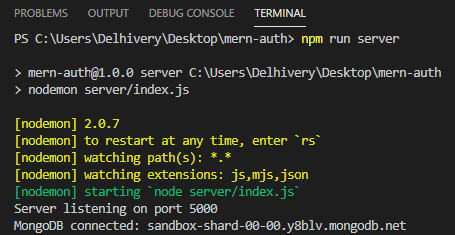
Our server is successfully listening on port 5000 and our application is connected to the MongoDB database.
We have one minor issue to fix.
Currently, we have two servers. We have one server created by create-react-app listening on port 3000. We also have our Express server listening on port 5000. We can start both these servers on separate terminals, but it gets tiring soon. We will use a tool called concurrently which will help us run multiple npm scripts in parallel.
PS C:\Users\Delhivery\Desktop\mern-auth> npm i concurrentlyNow update the package.json file.
{
  "name": "mern-auth",
  "version": "1.0.0",
  "description": "",
  "main": "index.js",
  "scripts": {
    "client": "npm run start --prefix client",
    "server": "nodemon index.js",
    "dev": "concurrently \"npm run client\" \"npm run server\""
  },
  "author": "",
  "license": "ISC",
  "dependencies": {
    "concurrently": "^6.0.2",
    "dotenv": "^8.2.0",
    "express": "^4.17.1",
    "mongoose": "^5.12.4"
  },
  "devDependencies": {
    "nodemon": "^2.0.7"
  }
}
Now, we can start the create-react-app server using the command npm run client. We can start the Express server using the command npm run server and we can start both the servers in parallel using npm run dev.
Setting up routes & creating route handlers
Whenever a new user fills in the registration form and clicks on the Register button, we will make a POST request to the /api/users/register endpoint.
Inside the server folder, create a folder named routes. And inside the routes folder, create a file named userRoutes.js.
  "/register",
  asyncHandler(async (req, res, next) => {
    const { firstName, lastName, email, password } = req.body;

    const userExists = await User.findOne({ email });

    if (userExists) {
      const err = new Error("User already registered");
      err.status = 400;
      next(err);
    }

    const user = await User.create({
      firstName,
      lastName,
      email,
      password,
    });

    res.json({ message: "New user created" });
  })
);

module.exports = router;
Note: In
userRoutes.jsfile, we have defined route handler callbacks directly inside the router functions. You will often come across blog posts/courses, where the callbacks are defined separately inside a controller module. Either of the approach is fine.
Above, we use an npm package called express-async-handler to handle exceptions inside of async express routes and pass them to express error handlers.
The logic inside the route handler function is as follows:
Check whether we already have a user in the database with the provided email address. If yes, send an error message - User already registered - to the client. Otherwise, create a new document in the database and send a message - New user created - to the client.
Note that when a user exists, we create a custom error and pass it to the next() function. Any error passed to the next() function is handled by the built-in error handler in Express. However, we are going to define a custom error handler.
At the end of the userRoutes.js file, we export the Router object.
Defining a custom error handler
Inside the server folder, create a folder named middleware and inside the middleware folder create a file named errorMiddleware.js and paste the following code snippet in the file.
const globalErrorHandler = (err, req, res, next) => {
  err.status = err.status || 500
  res.status(err.status).json({
    message: err.message,
    stack: process.env.NODE_ENV === "production" ? null : err.stack,
  })
}

module.exports = globalErrorHandler
There is one issue that we need to fix though. In the userRoutes.js file, you will notice that we are saving the user’s password in the database as plain text. This poses security concerns. Therefore, we must hash the password before we save it to the database. In order to hash the password, we will use a package called bcryptjs.
Hashing: A secure way to store passwords is to transform them into data that can’t be converted back to original passwords. This one way security mechanism is known as hashing.
One more thing: we will not hash the password inside the route handler function. Instead, we will mongoose pre middleware function, which is specified on the schema level.
Mongoose middleware: In Mongoose, middlewares let you attach your own custom logic to built-in mongoose functions. Middleware functions are sometimes called hooks. That’s because middlewares let you hook into existing functions.
First, install bcryptjs.
PS C:\Users\Delhivery\Desktop\mern-auth> npm i bcryptjsAdd the highlighted code snippets below in userModel.js.
const mongoose = require("mongoose")
const bcrypt = require("bcryptjs")

const userSchema = new mongoose.Schema({
  firstName: {
    type: String,
    required: true,
  },
  lastName: {
    type: String,
    required: true,
  },
  email: {
    type: String,
    unique: true,
    required: true,
  },
  password: {
    type: String,
    required: true,
  },
})

userSchema.pre("save", async function () {
  const salt = await bcrypt.genSalt(10)
  this.password = await bcrypt.hash(this.password, salt)
})

const User = mongoose.model("User", userSchema)

module.exports = User
Mongoose will call the pre(‘save’) function before sending the fields to the database. Hold on a sec. Where are we using the save() function? Notice that in the route handler function responsible for handling the /api/users/register endpoint, we are using the create function of the User model to create a new user. The create() function is actually a thin wrapper around the save() function.
The genSalt() method takes in a number known as salt rounds (aka cost), which is a measure of the no. of steps involved in creating the hash. The second argument to the hash() method is salt, which is a random string combined with the password to generate the hashed password.
Server-side form validation
We have already discussed the point that we should never trust the data coming from the client. It is possible for a malicious user to by-pass client-side validation and send bad data to the server. So, it’s important that we do server side validation of the form data as a security best-practice.
We will use a package called joi, which is a schema description language and data validator for JavaScript.
Install joi.
PS C:\Users\Delhivery\Desktop\mern-auth> npm i joiInside the server folder, create a folder named validation and inside the validation folder create a file named validate.js.
Inside the validate.js file, paste the following code snippet.
const Joi = require("joi")

const registrationValidation = formData => {
  const schema = Joi.object({
    firstName: Joi.string().required().max(20),
    lastName: Joi.string().required().max(20),
    email: Joi.string().required().email(),
    password: Joi.string().required().min(5),
  })

  return schema.validate(formData)
}

module.exports = { registrationValidation }
Now, add the highlighted code snippets in userRoutes.js file.
onst express = require("express");
const asyncHandler = require("express-async-handler");
const User = require("../models/userModel");
const { registrationValidation } = require("../validation/validate");

const router = express.Router();

router.post(
  "/register",
  asyncHandler(async (req, res, next) => {
    const { error } = registrationValidation(req.body);

    if (error) {
      const err = new Error(error.details[0].message);
      err.status = 400;
      next(err);
    }

    const { firstName, lastName, email, password } = req.body;

    const userExists = await User.findOne({ email });

    if (userExists) {
      const err = new Error("User already registered");
      err.status = 400;
      next(err);
    }

    const user = await User.create({
      firstName,
      lastName,
      email,
      password,
    });

    res.json({ message: "New user created" });
  })
);

module.exports = router;
Using the Router module
To use the Router module, we require the userRoutes.js module in index.js and then call use() on the Express application (app) to add the router in the middleware handling chain.
We also require the errorHandler.js module and define it after all the app.use() calls, because an error handler must be the last middleware in the request processing pipeline.
const express = require("express")
const dotenv = require("dotenv")
const globalErrorHandler = require("./middleware/errorMiddleware")
const userRoutes = require("./routes/userRoutes")

const connectDB = require("./config/db")

dotenv.config()

connectDB()

const app = express()

app.use(express.json())

app.use("/api/users", userRoutes)

app.use(globalErrorHandler)

const PORT = process.env.PORT || 5000

app.listen(PORT, () => {
  console.log(`Server listening on port ${PORT}`)
})
Go to part-9