Implement JWT Based User Authentication in a MERN Stack App - Part 9
By Hemanta Sundaray on 2021-05-23
This blog post is part of a series. You must finish part-1, part-2, part-3, part-4, part-5, part-6, part-7 & part-8 before continuing here.
Using Redux as a state management library is a pain in the ass. I am sure you would agree with some of the major concerns of Redux users as mentioned below:
- Redux requires too much boilerplate code.
- Configuring a Redux store is too complicated.
- You have to add too many packages to do anything useful with Redux.
- You must do all the state updates immutably and writing immutable logic is hard. Accidentally mutating the state in reducers is the single most common mistake made by Redux users.
Redux Toolkit includes utilities that address all the above-mentioned concerns. It simplifies your Redux code and lets you focus on the core logic of your application, so you can do more work with less code. Redux Toolkit is the recommended approach for writing Redux logic.
I am a huge fan of Redux Toolkit. Ever since I started using Redux Toolkit, I find developing applications with large amounts of application state that require complex update logic an absolute breeze. At the end of the series, if I would have convinced you to use Redux Toolkit, I would have done my job.
Must-know Redux Terms
Before I explain how Redux Toolkit works, you must have a basic understanding of the following terms:
Action
You can think of an action as an event that describes something that happened in the application. For example, clicking on an “Add to Cart” button would be considered as an event.
An action is a plain JavaScript object that has a type field and a payload field. The type field, which should be a string, refers to the name of the action. And the payload field contains the information about the action.
Action Creator
An action creator is a function that creates and returns an action object. We typically use these so we don’t have to write the action object by hand every time.
Reducer
A reducer is a function that receives the current state and an action object, decides how to update the state if necessary, and returns the new state: (state, action) => newState. You can think of a reducer as an event listener which handles events based on the received action (event) type.
Store
The current Redux application state lives in an object called the store.
Dispatch
The only way to update the state is by passing an action object to the dispatch function. You can think of dispatching actions as “triggering an event” in the application. Reducers act like event listeners, and when they hear an action they are interested in, they update the state in response.
Installation
Redux Toolkit is available as a package on npm.
npm i @reduxjs/toolkitIn addition, we need to install react-redux, which lets React components read data from a Redux store and dispatch actions to the store to update state.
PS C:\Users\Delhivery\Desktop\mern-auth\client> npm i react-reduxNote: Redux Toolkit only covers the Redux logic. We still use React-Redux to let our React components talk to the Redux store.
Create a Redux Store
Create a file called store.js inside the src folder. We will start by creating and exporting an empty Redux store. We can create a Redux store by using the configureStore API from Redux Toolkit.
import { configureStore } from "@reduxjs/toolkit"

export default configureStore({
  reducer: {},
})
The configureStore API automatically configures Redux DevTools Extension so that we can inspect the store while developing.
Redux DevTools Extension: Redux DevTools provides a debugging platform for Redux apps. It shows a history of changes to the state in your Redux store over time. This allows you to debug your applications effectively. You can install Redux DevTools as a browser extension.
Then, we need to import the Redux store into our application’s entry point - src/index.js and wrap the root component - App.js - with the Provider component from react-redux.
import React from "react"
import ReactDOM from "react-dom"
import "./index.css"
import App from "./App"
import "bootstrap/dist/css/bootstrap.css"
import { BrowserRouter as Router } from "react-router-dom"
import { Provider } from "react-redux"
import store from "./store"

ReactDOM.render(
  <Provider store={store}>
    <Router>
      <App />
    </Router>
  </Provider>,
  document.getElementById("root")
)
The Provider component makes the Redux store available to any nested components. And since we have rendered the Provider component at the top level, all of our React components can now access the global Redux store.
Create a Redux state slice
Inside the components folder, create a folder named stateSlices and inside the stateSlices folder, create a file named registerSlice.js.
import { createSlice, createAsyncThunk } from "@reduxjs/toolkit"
import axios from "axios"

const initialState = {
  status: "idle",
  userRegistered: null,
  error: null,
}

export const registerUser = createAsyncThunk(
  "register/registerUser",
  async (registrationFormData, { rejectWithValue }) => {
    try {
      const { data } = await axios.post(
        "/api/users/register",
        registrationFormData
      )
      return data
    } catch (err) {
      return rejectWithValue(err.response.data)
    }
  }
)

export const registerSlice = createSlice({
  name: "register",
  initialState,
  reducers: {},
  extraReducers: {
    [registerUser.pending]: (state, action) => {
      state.status = "loading"
    },
    [registerUser.fulfilled]: (state, action) => {
      state.status = "succeeded"
      state.userRegistered = true
    },
    [registerUser.rejected]: (state, action) => {
      state.status = "failed"
      state.error = action.payload.message
    },
  },
})

export default registerSlice.reducer
We need to install axios, which is an HTTP client used to send HTTP requests and retrieve their responses from a server.
PS C:\Users\Delhivery\Desktop\mern-auth\client> npm i axiosIt is very likely that you don’t understand a single line of code that we have written inside the registerSlice.js file. You probably have a zillion questions swirling inside your head. Don’t worry though. We will unpack everything step-by-step. First, we must understand some important concepts.
What the hell are slices?
A Redux store is typically organized into slices. You can think of a slice as a single feature of your application. User registration is a feature of our application and registerSlice.js is the file responsible for dealing with that feature.
We create a slice using the createSlice function from Redux Toolkit. The createSlice function needs a string name to identify the slice, an initialState and one or more reducer functions that define how the state can be updated. We use the status field of the initialState object to decide what to show in our UI.
One of the cool features of Redux Toolkit is that we can write mutating logic inside a reducer function because createSlice converts those mutations into safe immutable updates internally using the Immer library. We don’t have this luxury in Redux where we must write all state updates immutably, by making copies of data and then updating those copies. However, you must take precaution to not mutate any data outside createSlice.
In the registerSlice.js file, we have named our slice register. You will also notice that we haven’t defined any functions(reducers) inside the reducers field. You will soon understand why. We will discuss the extraReducers field, which is meant to reference external actions, once we understand the concept of updating the Redux store with asynchronous logic.
What is createAsyncThunk?
By itself a Redux store does not know anything about asynchronous logic. It only knows how to synchronously dispatch actions, update the state and notify the UI that something has changed.
In our case, when a user clicks on the Register button, we make a POST request to the /api/users/register endpoint. This network request is an asynchronous operation.
Asynchronous operation: An asynchronous operation is an operation that we can wait on while moving on to other tasks. Making a network request, querying a database, etc. are examples of asynchronous operations, which return Promise objects that represent the eventual outcome of the operation.
How can we then write asynchronous code and let it interact with the store? We can write asynchronous code by using a middleware provided by Redux Toolkit called redux-thunk. Fortunately, Redux Toolkit’s configureStore function sets up this middleware by default.
We write any asynchronous logic inside a function known as a thunk. In registerSlice.js file, the registerUser function (the thunk) is where we make API calls to the server.
What is a thunk?
Thunk is a functional programming technique used to delay computation. Instead of performing some work now, you produce a function or an unevaluated expression (the thunk), which can be used to perform the work later.
Also, note that createSlice does not have any special support for defining thunks. We write thunks as separate functions in the same slice file.
createAsyncThunk accepts two arguments. The first argument is a string used as the prefix for generated action types. The second argument is a callback function that returns a Promise containing some data, or a rejected Promise with an error.
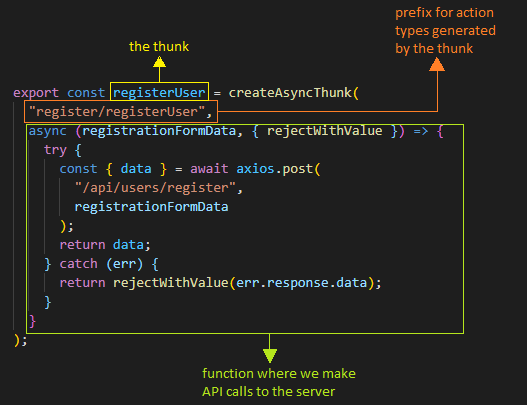
Thunks automatically dispatch pending/fulfilled/rejected action types for us. We respond to these actions by using the extraReducers field in the createSlice function.
In order to understand pending/fulfilled/rejected action types, we must understand the four possible states that an API call can be in.
When we make an API call, we can view its progress as follows:
The request has not started yet. This is represented by the value idle of the status field inside the initialState object.
The request is in progress. We change the status field inside the initialState object as loading and show a spinner in the UI.
The request succeeds. We change the value of the status field inside the initialState object as fulfilled. The thunk dispatches a success action containing the data in the payload field of the action object.
The request fails. We change the value of the status field inside the initialState object as rejected.The thunk dispatches a failure action containing the error details. We will catch the error using the rejectWithValue utility from Redux Toolkit. The error will be available as action.payload.message.
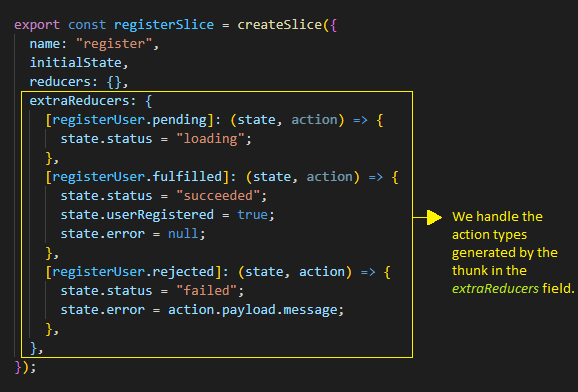
On line 44 in the registerSlice.js file, we export registerSlice.reducer, which is created automatically by createSlice.
Now, you should have a pretty good understanding of the code inside registerSlice.js file.
Add slice reducers to the store
import { configureStore } from "@reduxjs/toolkit"
import registerReducer from "./components/stateSlices/registerSlice"

export default configureStore({
  reducer: {
    register: registerReducer,
  },
})
We import the reducer function exported from registerSlice.js file as registerReducer and add it to the store. The object {register: registerReducer} says that we want to have a state.register slice of the global Redux state object and we want the registerReducer function to be in charge of deciding if and how to update the state.register slice whenever an action is dispatched.
Using Redux state & action in components
Update the RegisterForm.js file with the following highlighted code snippets.
import React from "react"
import { useFormik } from "formik"
import * as Yup from "yup"
import { useDispatch, useSelector } from "react-redux"
import { registerUser } from "./stateSlices/registerSlice"

const RegisterForm = ({ history }) => {
  const dispatch = useDispatch()

  const { status, userRegistered, error } = useSelector(state => state.register)

  const formik = useFormik({
    initialValues: {
      firstName: "",
      lastName: "",
      email: "",
      password: "",
    },
    validationSchema: Yup.object({
      firstName: Yup.string()
        .max(20, "Must be 20 characters or less")
        .required("Please enter your first name"),
      lastName: Yup.string()
        .max(20, "Must be 20 characters or less")
        .required("Please enter your last name"),
      email: Yup.string()
        .email("Invalid email address")
        .required("Please enter your email address"),
      password: Yup.string()
        .min(5, "Must be 5 characters or more")
        .required("Please enter your password"),
    }),

    onSubmit: values => {
      dispatch(registerUser(values))
    },
  })

  if (userRegistered) {
    history.push("/login")
  }

  return (
    <div className="register-form-container">
      <div className="col-10 col-sm-8 col-md-5 mx-auto">
        <h1 className="font-weight-bold">Register</h1>
      </div>

      <form onSubmit={formik.handleSubmit}>
        <div className="form-group col-10 col-sm-8 col-md-5 mx-auto mt-5">
          {error && (
            <div className="alert alert-danger" role="alert">
              {error}
            </div>
          )}
          <label htmlFor="firstName">First Name</label>
          <input
            className="form-control form-control-lg"
            id="firstName"
            name="firstName"
            type="text"
            {...formik.getFieldProps("firstName")}
          />
          {formik.touched.firstName && formik.errors.firstName ? (
            <small className="form-text text-danger">
              {formik.errors.firstName}
            </small>
          ) : null}
        </div>
        <div className="form-group col-10 col-sm-8 col-md-5 mx-auto">
          <label htmlFor="lastName">Last Name</label>
          <input
            className="form-control form-control-lg"
            id="lastName"
            name="lastName"
            type="text"
            {...formik.getFieldProps("lastName")}
          />
          {formik.touched.lastName && formik.errors.lastName ? (
            <small className="form-text text-danger">
              {formik.errors.lastName}
            </small>
          ) : null}
        </div>
        <div className="form-group col-10 col-sm-8 col-md-5 mx-auto">
          <label htmlFor="email">Email</label>
          <input
            className="form-control form-control-lg"
            id="email"
            name="email"
            type="email"
            {...formik.getFieldProps("email")}
          />
          {formik.touched.email && formik.errors.email ? (
            <small className="form-text text-danger">
              {formik.errors.email}
            </small>
          ) : null}
        </div>
        <div className="form-group col-10 col-sm-8 col-md-5 mx-auto">
          <label htmlFor="password">Password</label>
          <input
            className="form-control form-control-lg"
            id="password"
            name="password"
            type="password"
            {...formik.getFieldProps("password")}
          />
          {formik.touched.password && formik.errors.password ? (
            <small className="form-text text-danger">
              {formik.errors.password}
            </small>
          ) : null}
        </div>
        <div className="col-10 col-sm-8 col-md-5 mx-auto">
          <button
            type="submit"
            className="btn btn-lg btn-primary btn-block register-button"
          >
            {status === "loading" ? (
              <div className="spinner-border text-light" role="status">
                <span className="sr-only">Loading...</span>
              </div>
            ) : null}{" "}
            Register
          </button>
        </div>
      </form>
    </div>
  )
}

export default RegisterForm
Let’s understand what’s going on in the file.
Line 4: We import useDispatch and useSelector hooks from react-redux. We can read data from the store using useSelector and dispatch actions to the store using useDispatch.
Line 5: We import the registerUser thunk from the registerSlice.js file.
Line 7: The RegisterForm component is wrapped by the Route component from react-router-dom. Therefore, we have access to the history prop.
Line 8: We get access to the dispatch function of the Redux store using the useDispatch hook from react-redux.
Line 10: We use the useSelector hook to access the register slice of the global Redux store. Note that the state passed as the first argument to the useSelector function refers to the global Redux store. We then extract the status, userRegistered and the error fields of the register object.
Line 35: When a user fills in the registration form and clicks on the Register button, we send the registerUser thunk to the store. We pass in the values variable as an argument of the dispatch function. We know that the values variable refers to our form data.
Note: We can only pass one argument to the thunk when we dispatch it. For multiple values, we need to pass them in a single object.
Line [39-41]: We check for the userRegistered value. Only when our API call succeeds (meaning when a user is successfully registered), we change the value of userRegistered from null to true. And when the value of userRegistered is true, we use the history prop to direct the user to the login form.
Line [51:55]: If the user registration process is unsuccessful, we show an error message at the top of the form. We use a Bootstrap alert component to show the error message.
Line [120:124]: We check the value of status and only when the value of status is loading, we show a spinner (using the Bootstrap Spinner component) next to the Register text.
What happens when a user clicks on the Register button?
When a user clicks on the Register button, we send the registerUser thunk to the store. A thunk can be dispatched like a regular action. We dispatch the thunk as the first argument of the dispatch function. The dispatch function is able to accept a function as its argument thanks to the react-redux middleware.
Any value we dispatch to the Redux store passes through the react-redux middleware. If the action we send is a plain object, the middleware passes that action to the store. If the action is a function (which is true in our case), the middleware intercepts and invokes (executes) the function (the thunk).
When we call dispatch(registerUser()), the registerUser thunk will first dispatch an action type of register/registerUser/pending. We listen to the pending action inside the extraReducers field and mark the value of the status field as loading. We then use this value to show a spinner inside the Register button.
When the registerUser thunk is executed, We make a HTTP POST request to the /api/users/register endpoint. The Promise resolves and the server responds with a json object - {“message” : “New user created”}. This data is available as action.payload. We mark the status as fulfilled. We don’t do anything with action.payload. Instead, we change the value of the userRegistered field inside the initialState object from null to true. We then use this value in RegisterForm to direct the user to the login page.
Go to part-10