Implement JWT Based User Authentication in a MERN Stack App - Part 7
By Hemanta Sundaray on 2021-05-23
This blog post is part of a series. You must finish part-1, part-2, part-3, part-4, part-5 & part-6 before continuing here.
We will use mongoose to interact with our database. Mongoose will act as the frontend to our MongoDB database.
What is mongoose?
Mongoose is what is known as an Object Data Model (ODM). An ODM represents the website’s data as JavaScript objects, which are then mapped to the underlying database.
ODMs are often slower because they often use translation code to map between objects and the database format. The benefit of using an ODM is that programmers can continue to think in terms of JavaScript objects rather than database semantics. Moreover, using an ODM often results in lower costs for development and maintenance.
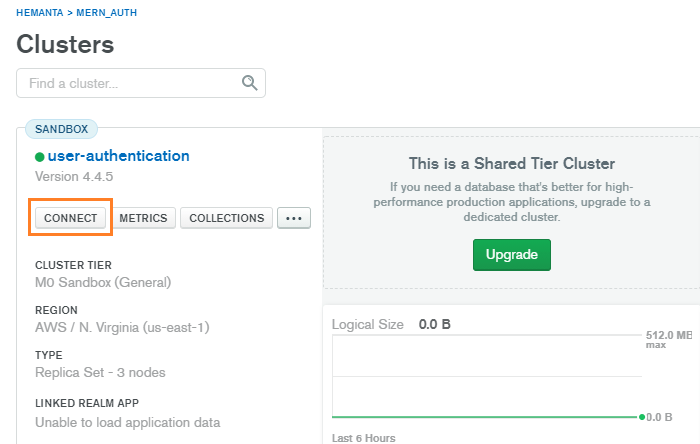
Sign in to your MongoDB Atlas account. In the clusters view, click on CONNECT.
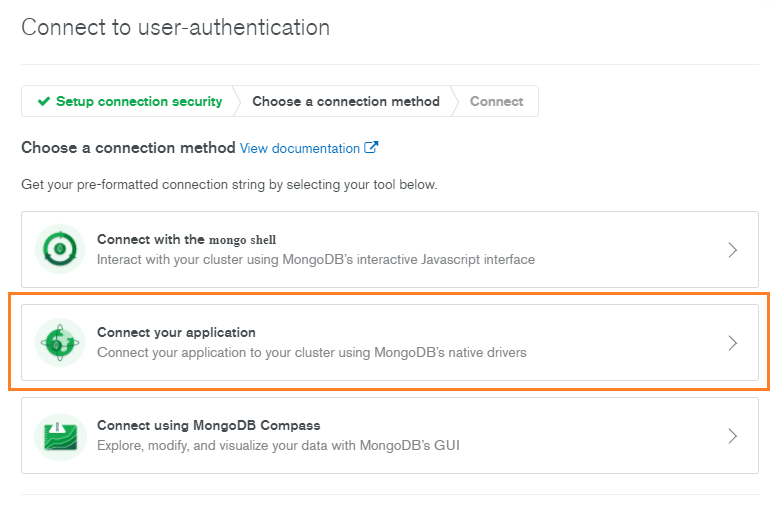
Then, click on Connect your application.
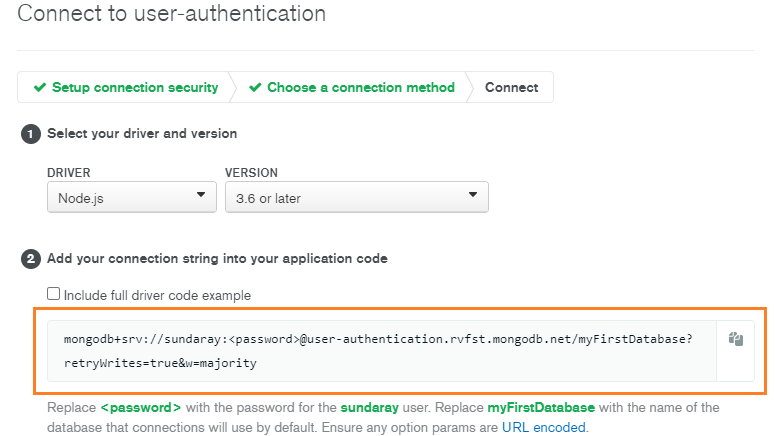
Copy the connection string.
Back to our application, create a .env file in the mern-auth folder.
In the .env file, paste the connection string that you copied from MongoDB Atlas as the value of the key MONGO_URI. Don’t place the connection string within double quotes.
MONGO_URI=mongodb+srv://sundaray:<password>@sandbox.y8blv.mongodb.net/myFirstDatabase?retryWrites=true&w=majorityReplace <password> with the password that you have set for the database user. And replace myFirstDatabase with the name of your database.
What is a .env file?
.env is a simple configuration text file that is used to define environment variables that we want to pass into our application’s environment. By convention .env variable names are uppercase words separated by underscores. Variable names are directly followed by an =, which in turn is directly followed by the value, for example: VARIABLE_NAME=value.
The .env file will contain secret environment variables that we don’t want to expose to the outside world. If you are using git to push your code to a remote repository such as GitHub you wouldn’t want to push the .env file to GitHub and make it public. Therefore, add the .env file in the .gitignore file.
# See https://help.github.com/articles/ignoring-files/ for more about ignoring files.

# dependencies
**/node_modules
/.pnp
.pnp.js

# testing
/coverage

# production
/build

# misc
.env
.DS_Store
.env.local
.env.development.local
.env.test.local
.env.production.local

npm-debug.log*
yarn-debug.log*
yarn-error.log*
We have stored the connection string in the .env file. Next, we will use mongoose to connect to our MongoDB database.
Connecting to MongoDB
First, we need to install mongoose.
PS C:\Users\Delhivery\Desktop\mern-auth> npm i mongooseNote that installing mongoose adds all its dependencies including the MongoDB database driver. The MongoDB Node.js driver allows Node.js applications to connect to MongoDB and work with data.
We also need to install a module called dotenv that will help us load the environment variables we have defined inside the .env file into process.env.
PS C:\Users\Delhivery\Desktop\mern-auth> npm i dotenvNote that you can install multiple npm packages with a single command. All we need to do is to use the npm install command followed by multiple package names separated by spaces, as shown below:
PS C:\Users\Delhivery\Desktop\mern-auth> npm i mongoose dotenvInside the server folder, create a folder named config and inside the config folder create a file named db.js and paste the following code snippet in that file.
const mongoose = require("mongoose")
const dotenv = require("dotenv")

dotenv.config()

const connectDB = async () => {
  try {
    const conn = await mongoose.connect(process.env.MONGO_URI, {
      useNewUrlParser: true,
      useCreateIndex: true,
      useUnifiedTopology: true,
    })
    console.log(`MongoDB connected: ${conn.connection.host}`)
  } catch (error) {
    console.error(`Error: ${error.message}`)
    process.exit(1)
  }
}

module.exports = connectDB
Mongoose requires a connection to our MongoDB database. We connect to our MongoDB database using mongoose.connect method. The first argument to the connect method is our connection string.
The dotenv module loads the environment variables that we have defined inside the .env file as key-value pairs inside process.env. Therefore, we can access our connection string using process.env.MONGO_URI.
We can programmatically terminate a Node.js application by using the exit method of the process core module. When Node.js runs this line, the process is immediately forced to terminate. We can also pass an integer that signals the operating system the exit code.
Go to part-8