How to Build an Express/GraphQL Server - Part 4?
By Hemanta Sundaray on 2021-06-06
This blog post is part of a series. You must finish part-1, part-2 & part-3 before continuing here.
Fake REST API
In our schema.js file, we have hard-coded a list of users. However, in a real-world scenario, we will be fetching data from a database or a third-party API.
In this post, we are going simulate the real-world scenario by using json-server, a fake REST API, to which our GraphQL server will make HTTP requests to fetch data.
Let's install json-server.
PS C:\Users\Delhivery\Desktop\gql-app\server> npm i json-serverIn the server directory, make a new file named db.json and paste the following list of users.
{
    "users": [
      {
        "id": "45",
        "firstName": "Nicole",
        "age": 25,
      },
      {
        "id": "26",
        "firstName": "Alex",
        "age": 24,
      },
      {
        "id": "28",
        "firstName": "Harry",
        "age": 27,
      }
    ]
}
Make sure to use double quotes. Valid JSON requires double quotes.
In order to start our JSON server, we will add a helper script inside the package.json file.
{
  "name": "server",
  "version": "1.0.0",
  "description": "",
  "main": "index.js",
  "scripts": {
    "start": "nodemon index.js",
    "json:server": "json-server --watch db.json"
  },
  "keywords": [],
  "author": "",
  "license": "ISC",
  "dependencies": {
    "express": "^4.17.1",
    "express-graphql": "^0.12.0",
    "json-server": "^0.16.3",
    "lodash": "^4.17.21",
    "nodemon": "^2.0.7"
  }
}
Open a second terminal window and run the following command to start the JSON server.
PS C:\Users\Delhivery\Desktop\gql-app\server> npm run json:serverIn the console, you should see an outout like this:
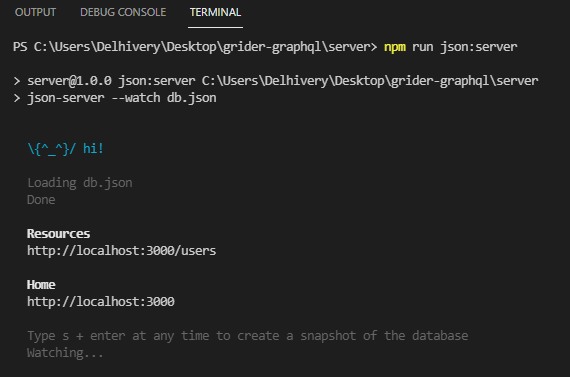
Our JSON server is running at http://localhost:3000 and we can get access to our list of users (which we have inside the db.json file) at the /users endpoint. If you visit http://localhost:3000/users URL, you should see the list of users.
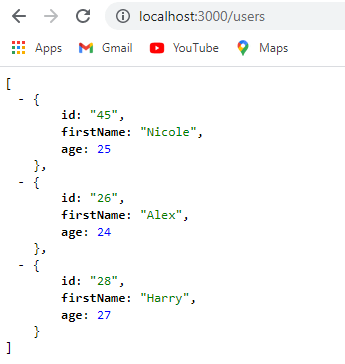
Note that json-server serves up raw JSON data.
It's imporatnt to note that the JSON server is a completely different running process than our GraphQL server.
The GraphiQL instance is running on port 5000 (http://localhost:5000/graphql), whereas the JSON server is running on port 3000 (http://localhost:3000).
If we go to http://localhost:3000/users/45, we get a single user with an id of 45.
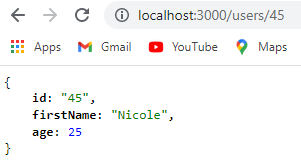
Now that our JSON server is running, we have to figure out a way to make a request from the GraphQL server to this fake REST API and fetch some data.
Async resolve function
Previously inside the resolve() function inside RootQuery, we synchronously fetched data which was hard-coded inside the schema.json file.
Now, with a fake REST API in place, GraphQL will make a network request to the JSON server to fetch user data. And making a network request is asynchronous in nature.
The resolve() function can also work in an asynchronous fashion.
If we return a Promise from the resolve() function, GraphQL will automatically detect that we have returned a Promise. It will then wait for the Promise to resolve, grab the data that the Promise resolved with and send the response back to the user.
So, when we will make a query from our GraphiQL interface, the query will go to GraphQL, which will then reach out to the JSON server by making a HTTP request. GraphQL will wait for the request to resolve and send the response it got from the JSON server back to the GraphiQL client.
We will use axios to make asynchronous HTTP requests inside the resolve() function
Let's install axios.
PS C:\Users\Delhivery\Desktop\gql-app\server> npm i axiosIn the schema.js file, we will remove the hard-coded list of users and the lodash import, because we will now make use of the JSON server.
Update the schema.js file as follows:
const graphql = require("graphql");
const axios = require("axios");

const { GraphQLString, GraphQLObjectType, GraphQLInt, GraphQLSchema } = graphql;

const UserType = new GraphQLObjectType({
  name: "User",
  fields: {
    id: { type: GraphQLString },
    firstName: { type: GraphQLString },
    age: { type: GraphQLInt },
  },
});

const RootQuery = new GraphQLObjectType({
  name: "RootQueryType",
  fields: {
    user: {
      type: UserType,
      args: { id: { type: GraphQLString } },
      resolve(parentValue, args) {
        return axios
          .get(`http://localhost:3000/users/${args.id}`)
          .then((res) => res.data);
      },
    },
  },
});

module.exports = new GraphQLSchema({
  query: RootQuery,
});
Note that when axios resolves, the actual response will be nested inside the data property.
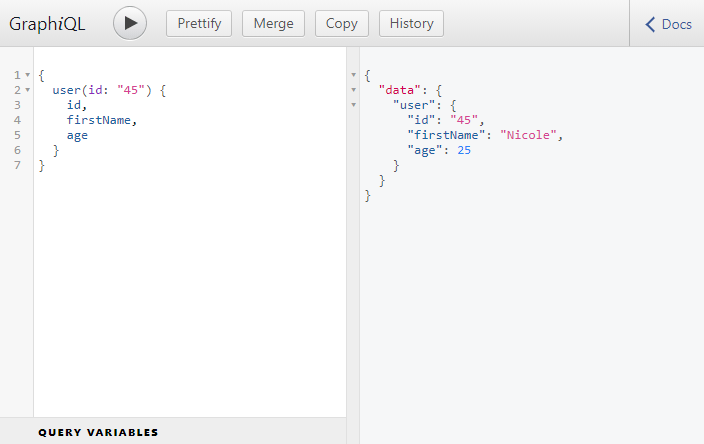
Make sure both the servers are running. Then go to GraphiQL and make a query for the user with an id of 45. And we get the response from the JSON server. Perfect.
Go to part-5