How to Build an Express/GraphQL Server - Part 5?
By Hemanta Sundaray on 2021-06-06
This blog post is part of a series. You must finish part-1, part-2, part-3 & part-4 before continuing here.
Adding a list of companies
Our schema has an idea about the presence of a user. Next, we will introduce the idea of a company and relate it to a user.
Every company will have an id, name and description. And we will associate a company with a particular user by adding a companyId property to the user object.
First off, we will create a list of two companies in the db.json file and add a companyId property to the individual users. Then we will go to our schema.js file and define a CompanyType.
{
  "users": [
    {
      "id": "45",
      "firstName": "Nicole",
      "age": 25,
      "companyId": "1"
    },
    {
      "id": "26",
      "firstName": "Alex",
      "age": 24,
      "companyId": "1"
    },
    {
      "id": "28",
      "firstName": "Harry",
      "age": 27,
      "companyId": "2"
    },
  ],
  "companies": [
    {
      "id": "1",
      "name": "SendGrid",
      "description": "Email"
    },
    {
      "id": "2",
      "name": "HP",
      "description": "Computer"
    }
  ]
}
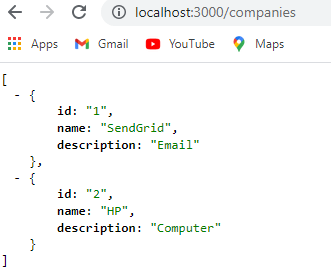
Now if we visit the JSON server at http://localhost:3000/companies, we get the list of companies that we have defined inside the db.json file.
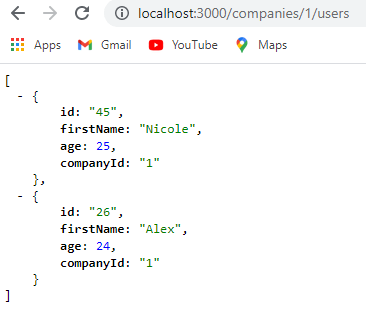
Because we have added the companyId property on each user, JSON server has behind the scenes mapped the relationship between the users and companies. So, if we visit http://localhost:3000/companies/1/users, we will get the list of users working at the company with an id of 1.
Defining a CompanyType
Our JSON server now has an idea about both the users & the companies.
Next, we will define a CompanyType in the schema.js file.
Make sure to define the CompanyType above the UserType. I will explain later why the order of the type definition is important.
We will define the CompanyType in exactly the same manner we defined the UserType.
const graphql = require("graphql");
const axios = require("axios");

const { GraphQLString, GraphQLObjectType, GraphQLInt, GraphQLSchema } = graphql;

const CompanyType = new GraphQLObjectType({
  name: "Company",
  fields: {
    id: { type: GraphQLString },
    name: { type: GraphQLString },
    description: { type: GraphQLString },
  },
});

const UserType = new GraphQLObjectType({
  name: "User",
  fields: {
    id: { type: GraphQLString },
    firstName: { type: GraphQLString },
    age: { type: GraphQLInt },
  },
});

const RootQuery = new GraphQLObjectType({
  name: "RootQueryType",
  fields: {
    user: {
      type: UserType,
      args: { id: { type: GraphQLString } },
      resolve(parentValue, args) {
        return axios
          .get(`http://localhost:3000/users/${args.id}`)
          .then((res) => res.data);
      },
    },
  },
});

module.exports = new GraphQLSchema({
  query: RootQuery,
});
Now that we have defined the CompanyType, we need to associate it with a user. We can do so by adding a company property inside the fields property of the UserType object.
Next, we will define a resolve() function so that GraphQL can find out the company associated with a given user.
Add the highlighted code snippets in the schema.js file.
const graphql = require("graphql");
const axios = require("axios");

const { GraphQLString, GraphQLObjectType, GraphQLInt, GraphQLSchema } = graphql;

const CompanyType = new GraphQLObjectType({
  name: "Company",
  fields: {
    id: { type: GraphQLString },
    name: { type: GraphQLString },
    description: { type: GraphQLString },
  },
});

const UserType = new GraphQLObjectType({
  name: "User",
  fields: () => ({
    id: { type: GraphQLString },
    firstName: { type: GraphQLString },
    age: { type: GraphQLInt },
    company: {
      type: CompanyType,
      resolve(parentValue, args) {
        return axios
          .get(`http://localhost:3000/companies/${parentValue.companyId}`)
          .then((res) => res.data);
      },
    },
  }),
});

const RootQuery = new GraphQLObjectType({
  name: "RootQueryType",
  fields: {
    user: {
      type: UserType,
      args: { id: { type: GraphQLString } },
      resolve(parentValue, args) {
        return axios
          .get(`http://localhost:3000/users/${args.id}`)
          .then((res) => res.data);
      },
    },
  },
});

module.exports = new GraphQLSchema({
  query: RootQuery,
});
This is the first time, we have made use of the parentValue argument on line 25. The companyId is available inside the parentValue argument. We can prove this by logging the value of parentValue in the console.
Make sure you have both the JSON server and the GraphiQL instance running. Add a console.log statement (console.log(parentValue, args)) inside the resolve() function of the UserType object.
Go to GraphiQL and make a query as shown below.
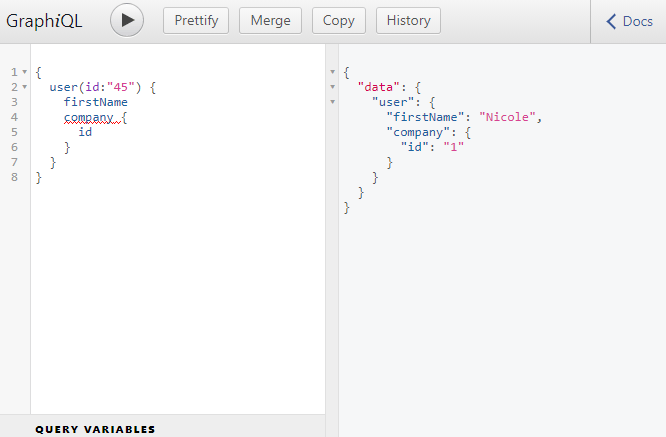
We are making a query so that the resolve() function inside the UserType object gets triggered and we can log the values of parentValue and args in the console.
Execute the query and now, you should see the following output in the console. As we can see, the companyId is available inside parentValue.

If we ask ask for the values of name and description of the company in our query, we get the apprpriate response as well.
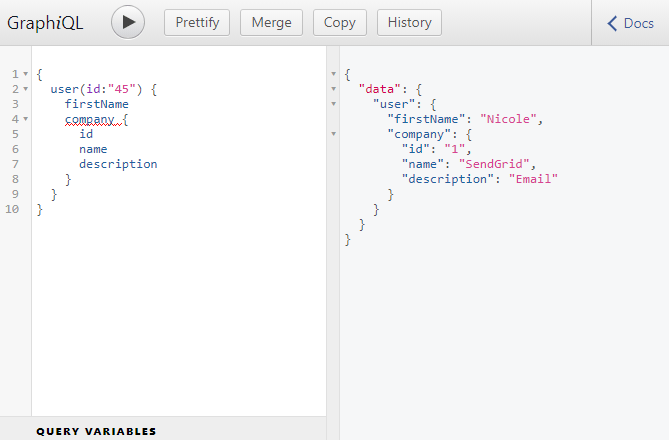
Now, let's understand the process that GraphQL went through to fetch the user(id:45) and the company associated with the user.
When we made the query, it went to RootQuery with an args object with an id property of 45. The RootQuery then pointed GraphQL to the user with an id of 45, thanks to the resolve() function.
We also wanted to know about the company associated with that user. This time the user’s resolve() function got called, with the first argument of parentValue and an empty args object. (The parentValue is the node on the graph the query is coming from, which is user 45 in our case.) The args object didn't get passed along the chain and the resolve() function of the UserType object returned a Promise that eventually returned to us the company we were looking for.
So, a better way to thing about schema is to think of them as a bunch of functions that return references to other objects in our graph and we can think of the edges in the graph as resolve() functions.
Go to part-6