JavaScript DOM Manipulation
By Hemanta Sundaray on 2021-05-26
- Node types
- getElementById()
- textContent
- innerHTML
- querySelector
- querySelector(‘tagname’)
- querySelector('#id')
- querySelector( ‘.class’);
- querySelectorAll()
- getElementsByClassName(‘class’)
- getElementsByTagName(“tag”)
- className
- classList
- setAttribute(‘attr’, “value”)
- getAttribute()
- removeAttribute()
- childNodes/children
- firstChild/firstElementChild
- lastChild/lastElementChild
- parentNode/parentElement
- previousSibling/previousElementSibling
- nextSibling/nextElementSibling
- createElement() & appendChild()
- insertBefore()
- removeChild()
Node types
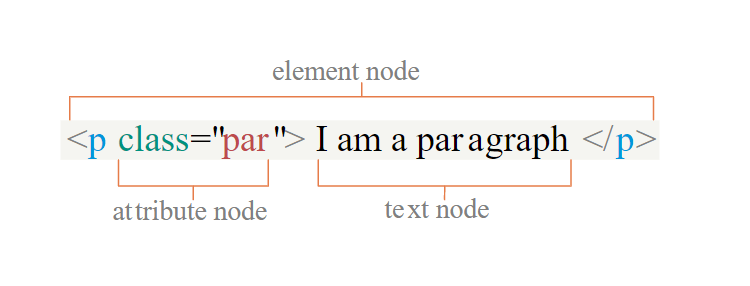
getElementById()
<ul id="list">
  <li>About</li>
  <li>Blog</li>
</ul>
const list = document.getElementById("list")- Returns the element that has the
idattribute with the specified value. - If there are more than one element having the same
id, thengetElementById()returns the first found element in the HTML document. - If the specified
iddoes not exist, the returned value is null.
textContent
<ul id="list">
  <li>About</li>
  <li>Blog</li>
</ul>
const list = document.getElementById("list")
console.log(list.textContent)list.textContent = "We are the list items."- Sets or returns the text content of the specified node and all its descendants.
- Setting the
textContentproperty removes and replaces any child nodes by a single text node containing the specified string.
innerHTML
- Sets or returns the HTML (inner HTML) content of an element.
list.innerHTML = "<h2>We are the list items.</h2>"querySelector
- Returns the first element in the document that matches specified css selector(s).
- The argument of
querySelector()method must follow the CSS syntax.
querySelector(‘tagname’)
<ul id="list">
  <li>About</li>
  <li>Blog</li>
</ul>
const list = document.querySelector('ul');querySelector('#id')
const list = document.querySelector("#list")querySelector( ‘.class’);
<ul class="list">
  <li>About</li>
  <li>Blog</li>
</ul>
const list = document.querySelector(".list")We can use querySelector not only with document but also with other elements.
querySelectorAll()
<ul class="list">
  <li class="list-item">About</li>
  <li class="list-item">Blog</li>
</ul>
const list = document.querySelectorAll(".list-item")- Returns all elements in the document that matches a specified CSS selector.
- Returns a NodeList, which is an array-like object.
- NodeList collection has a length property and a zero-based index.
- NodeList allows us to use the array
forEach()method without converting the NodeList into an array. But we can’t use other built-in array methods. - In order to use array methods except
forEach(), we need to convert the NodeList into an array. - We can convert NodeList into an array using
Array.from()method.
We can select multiple elements with multiple selectors separated by commas.
const list = document.querySelectorAll("ul, li")getElementsByClassName(‘class’)
<ul class="list">
  <li class="list-item">About</li>
  <li class="list-item">Blog</li>
</ul>
const list = document.getElementsByClassName("list-item")- Returns an HTML collection of all elements in the document with the specified class name.
- The HTML collection is not an array.
- The HTML collection has length property and has a zero-based index.
- We can use for loop with HTML collection.
- We can’t use array built-in methods with HTML collection.
getElementsByTagName(“tag”)
<ul class="list">
  <li class="list-item">About</li>
  <li class="list-item">Blog</li>
</ul>
const list = document.getElementsByTagName("li")- Returns an HTML collection of all the elements in the document with the specified tag name.
className
<ul class="list">
  <li class="list-item">About</li>
  <li class="list-item">Blog</li>
</ul>
const name = document.querySelector("ul").className
console.log(typeof name) // string- The
classNameproperty sets or returns the class name of an element (the value of an element’s class attribute). classNamereturns string value.
classList
<ul class="list">
  <li class="list-item">About</li>
  <li class="list-item">Blog</li>
</ul>
const name = document.querySelector("ul").classList- The
classListproperty returns the class name(s) of an element as a DOMTokenList object. - DOMTokenList has length property and has zero-based index numbers.
- The property is used to add, remove and toggle CSS classes on an element.
classListproperty is read only.classList.add(),classList.remove()andclassList.toggle()take argument as string values.
setAttribute(‘attr’, “value”)
<ul class="list">
  <li class="list-item">About</li>
  <li class="list-item">Blog</li>
</ul>
const name = document.querySelector("ul")
name.setAttribute("id", "main-list")- The
setAttribute()method adds the specified attribute to an element, and gives it the specified value. - If the attribute already exists, the value is updated.
const name = document.querySelector("ul")
name.setAttribute("class", "main-list")

console.log(name.className) // main-list
getAttribute()
<ul class="list">
  <li class="list-item">About</li>
  <li class="list-item">Blog</li>
</ul>
const name = document.querySelector("ul")
name.setAttribute("id", "main-list")
console.log(name.getAttribute("id")) // main-list- The
getAttribute()method returns the value of the attribute (as a string) with the specified name of an element. - Returns the value as string.
removeAttribute()
<ul class="list">
  <li class="list-item">About</li>
  <li class="list-item">Blog</li>
</ul>
const name = document.querySelector("ul")
name.setAttribute("id", "main-list")
console.log(name.hasAttribute("id")) // truehasAttribute()returns a boolean value.
childNodes/children
childNodes returns a collection of a node's child nodes as a NodeList object. It considers whitespace inside elements and comments as nodes.
<ul class="list">
  <li class="list-item">About</li>
  <li class="list-item">Blog</li>
</ul>
const nodes = document.querySelector("ul").childNodes
console.log(nodes)childrenreturns a collection of a node's element nodes (excluding text and comment nodes) as an HTML collection object.- It only returns element nodes.
const nodes = document.querySelector("ul").children

console.log(nodes)
firstChild/firstElementChild
firstChild returns the first child node of the specified node as a node object. It recognises white spaces as text nodes.
<ul class="list">
  <li class="list-item">About</li>
  <li class="list-item">Blog</li>
</ul>
const node = document.querySelector("ul").firstChild
console.log(node)firstElementChildreturns the first child element of the specified element as an element node.
const node = document.querySelector("ul").firstElementChild

console.log(node)
lastChild/lastElementChild
The lastChild property returns the last child node of the specified node, as a Node object.
<ul class="list">
  <li class="list-item">About</li>
  <li class="list-item">Blog</li>
</ul>
const last = document.querySelector("ul").lastChild
console.log(last)lastElementChildreturns the last child node as an element node (ignores text and comment nodes).
const last = document.querySelector("ul").lastElementChild

console.log(last)
parentNode/parentElement
parentNode returns the parent node of the specified node, as a Node object.
<ul class="list">
  <li class="list-item">About</li>
  <li class="list-item">Blog</li>
</ul>
const name = document.querySelector("li")
console.log(name.parentNode)parentElementreturns the parent element of the specified element. It returns null if the parent node is not an element node.
console.log(name.parentElement)previousSibling/previousElementSibling
<ul class="list">
  <button>Submit</button>
  <li class="list-item">About</li>
  <li class="list-item">Blog</li>
  <p>Hello World!</p>
</ul>previousSiblingreturns the previous node of the specified node at the same tree level as a Node object.- The returned node could be an element node, a text node or a comment node.
const listItem = document.querySelectorAll(".list-item")[0]

console.log(listItem.previousSibling)previousElementSiblingreturns the previous sibling node as an element node (ignores text and comment nodes).
const listItem = document.querySelectorAll(".list-item")[0]

console.log(listItem.previousElementSibling)
nextSibling/nextElementSibling
<ul class="list">
  <button>Submit</button>
  <li class="list-item">About</li>
  <li class="list-item">Blog</li>
  <p>Hello World!</p>
</ul>nextSiblingproperty returns the node (as a Node object) immediately following the specified node, at the same tree level.nextSiblingreturns the next sibling node as an element node, a text node or a comment node.
const listItem = document.querySelectorAll("li")[1]

console.log(listItem.nextSibling)- Returns the element immediately following the specified element, at the same tree level.
const listItem = document.querySelectorAll("li")[1]

console.log(listItem.nextElementSibling)
createElement() & appendChild()
createElement()creates an element node with the specified name.appendChild()appends a node as the last child of a node.
<ul class="list">
  <button>Submit</button>
  <li class="list-item">About</li>
  <li class="list-item">Blog</li>
  <p>Hello World!</p>
</ul>
const button = document.createElement("button")
button.textContent = "click"
const ul = document.querySelector("ul")
ul.appendChild(button)insertBefore()
- Inserts a node as a child, right before an existing child, which you specify.
<ul class="list">
  <button>Submit</button>
  <li class="list-item">About</li>
  <li class="list-item">Blog</li>
  <p>Hello World!</p>
</ul>
const button = document.createElement("button")
button.textContent = "click"
const ul = document.querySelector("ul")
const lastListItem = document.querySelectorAll("li")[1]
ul.insertBefore(button, lastListItem)removeChild()
- Removes a specified child node of the specified element.
<ul class="list">
  <button>Submit</button>
  <li class="list-item">About</li>
  <li class="list-item">Blog</li>
  <p>Hello World!</p>
</ul>
const par = document.querySelector("p")
const parParent = par.parentNode
parParent.removeChild(par)