Implement Pagination, Search & Filter in a React App - Part 3 - Pagination
By Hemanta Sundaray on 2021-06-25
This blog post is part of a series. You must complete part-1 & part-2 before continuing here.
In part-2, we implemented search functionality in our application. The last feature that is pending is pagination, which we are going to implement in this post.
Inside the components folder, create a file called Pagination.js.
We will use Bootstrap's pagination component. In addition, we will also show Previous and Next links.
import React from "react";
import _ from "lodash";

const Pagination = ({
  noOfPosts,
  postsPerPage,
  onPageChange,
  currentPage,
  onPreviousClick,
  onNextClick,
}) => {

  const noOfPages = Math.ceil(noOfPosts.length / postsPerPage);
  const pages = _.range(1, noOfPages + 1);

  if (noOfPages === 1) return null;

  return (
    <nav>
      <ul className="pagination">
        {currentPage !== 1 && (
          <li className="page-item">
            <a
              className="page-link"
              style={{ cursor: "pointer" }}
              onClick={onPreviousClick}
            >
              Previous
            </a>
          </li>
        )}

        {pages.map((page) => (
          <li
            key={page}
            className={page === currentPage ? "page-item active" : "page-item"}
          >
            <a
              className="page-link"
              style={{ cursor: "pointer" }}
              onClick={() => onPageChange(page)}
            >
              {page}
            </a>
          </li>
        ))}
        {currentPage !== noOfPages && (
          <li className="page-item">
            <a
              className="page-link"
              style={{ cursor: "pointer" }}
              onClick={onNextClick}
            >
              Next
            </a>
          </li>
        )}
      </ul>
    </nav>
  );
};

export default Pagination;
Let's understand the code we have written inside the Pagination component.
LINE 13-14: We determine the total no of links in the pagination by dividing the total no. of posts with the no. of posts that we decide to display on a single page. We have 10 posts in total and we have decided to display 4 posts per page. So we end up with 2.5 (10/4) links, which doesn't make any sense. So, we round this number upwards to its nearest integer using the Math.ceil() method. Math.ceil(10/4) gives us 3, which we then convert to an array using the _.range method from lodash.
LINE 16: If we have only one page in our application (which will be true if we have, let's say, 3 posts in total), we will not show any pagination.
The rest of the code should be easy to understand. Note that we decide to show the Previous link whenever we click on any page except page no 1. Similarly, we show the Next link whenever we click on any page except the last page.
Next, we will render the Pagination component inside the App component. Add the highlighted code snippets in the App.js file.
import React, { useState } from "react";
import Posts from "./components/Posts";
import Categories from "./components/Categories";
import { useDispatch, useSelector } from "react-redux";
import { filterPosts } from "./components/blog-state";
import SearchBar from "./components/SearchBar";
import Pagination from "./components/Pagination";

const App = () => {
  const { posts } = useSelector((state) => state.blog);

  const [filter, setFilter] = useState(false);
  const [currentCategory, setCurrentCategory] = useState("");
  const [searchQuery, setSearchQuery] = useState("");
  const [currentPage, setCurrentPage] = useState(1);
  const [postsPerPage, setPostsPerPage] = useState(4);

  // Category filter
  const dispatch = useDispatch();

  const categoryChangeHandler = (category) => {
    setCurrentCategory(category);
    setCurrentPage(1);
    if (category === "All Categories") {
      setFilter(false);
    } else {
      setSearchQuery("");
      dispatch(filterPosts(category));
      setFilter(true);
    }
  };

  //End of category filter

  //Search

  const searchChangeHandler = (query) => {
    setCurrentCategory("");
    setFilter(false);
    setSearchQuery(query);
  };

  // End of search

  // Pagination

  const previousClickHandler = () => {
    setCurrentPage(currentPage - 1);
  };

  const nextClickHandler = () => {
    setCurrentPage(currentPage + 1);
  };

  const pageChangeHandler = (page) => {
    setCurrentPage(page);
  };

  // End of pagination

  return (
    <div className="container">
      <div className="row row-one justify-content-center">
        <SearchBar value={searchQuery} onChange={searchChangeHandler} />
      </div>
      <div className="row justify-content-center mb-3">
        <div className="title col-md-6">
          <Posts
            filter={filter}
            searchQuery={searchQuery}
          />
        </div>
        <div className="category col-md-2">
          <Categories
            currentCategory={currentCategory}
            categoryChangeHandler={categoryChangeHandler}
          />
        </div>
      </div>
      <div className="row">
        <div className="col offset-md-2">
          {!searchQuery && !filter && (
            <Pagination
              currentPage={currentPage}
              postsPerPage={postsPerPage}
              noOfPosts={posts}
              onPreviousClick={previousClickHandler}
              onNextClick={nextClickHandler}
              onPageChange={pageChangeHandler}
            />
          )}
        </div>
      </div>
    </div>
  );
};
export default App;
We keep track of the current page in the currentPage variable. Clicking on the Next and Previous links will trigger nextPageHandler and previousPageHandler functions respectively, which will then add or subtract 1 from the value of currentPage.
Note that we don't show any pagination if we have applied a category filter or our search query is not an empty string.
With this, we have the pagination component ready.
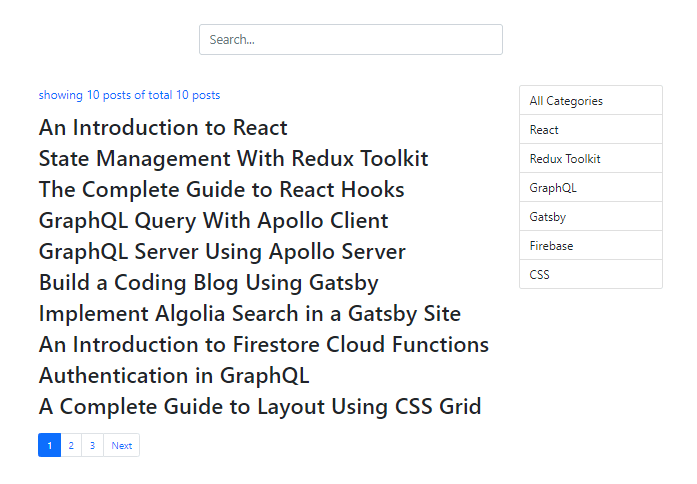
However, the pagination component lacks functionality. That's because we are mapping through the posts array which contains 10 blog posts. To fix this, we will paginate the posts array.
In the components folder, create a folder named utils and inside the utils folder, create a file named paginate.js.
import _ from "lodash";

export const paginate = (totalPosts, pageNumber, pageSize) => {
  const startIndex = (pageNumber - 1) * pageSize;
  return _(totalPosts).slice(startIndex).take(pageSize).value();
};
Then, we import the paginate() function inside the Posts.js component and create a paginatedPosts array by passing in the required arguments to the paginate() function.
Add the highlighted code snippets in the Posts.js file.
import React from "react";
import { useSelector } from "react-redux";
import { paginate } from "../utils/paginate";

const Posts = ({ filter, searchQuery, pageNumber, pageSize }) => {
  const { posts } = useSelector((state) => state.blog);
  const { filteredPosts } = useSelector((state) => state.blog);

  let searchResult;
  if (searchQuery) {
    searchResult = posts.filter((post) =>
      post.title.toLowerCase().includes(searchQuery.toLowerCase())
    );
  }

  const paginatedPosts = paginate(posts, pageNumber, pageSize);

  return (
    <>
      <p>
        showing{" "}
        {filter
          ? filteredPosts.length
          : searchQuery
          ? searchResult.length
          : paginatedPosts.length}{" "}
        posts of total {posts.length} posts
      </p>{" "}
      <div>
        {!filter &&
          !searchQuery &&
          paginatedPosts.map((post) => (
            <article key={post.id}>
              <h2> {post.title}</h2>
            </article>
          ))}
        {filter &&
          filteredPosts.map((post) => (
            <article key={post.id}>
              <h2> {post.title}</h2>
            </article>
          ))}
        {searchQuery &&
          searchResult.map((post) => (
            <article key={post.id}>
              <h2> {post.title}</h2>
            </article>
          ))}
      </div>
    </>
  );
};

export default Posts;
Finally, we have to pass the pageNumber & pageSize props to the Posts component rendered inside the App component.
Add the highlighted code snippets in the App.js file.
import React, { useState } from "react";
import Posts from "./components/Posts";
import Categories from "./components/Categories";
import { useDispatch, useSelector } from "react-redux";
import { filterPosts } from "./components/blog-state";
import SearchBar from "./components/SearchBar";
import Pagination from "./components/Pagination";

const App = () => {


// rest of the code


  return (
    <div className="container">
      <div className="row row-one justify-content-center">
        <SearchBar value={searchQuery} onChange={searchChangeHandler} />
      </div>
      <div className="row justify-content-center mb-3">
        <div className="title col-md-6">
          <Posts
            filter={filter}
            searchQuery={searchQuery}
            pageNumber={currentPage}
            pageSize={postsPerPage}
          />
        </div>
        <div className="category col-md-2">
          <Categories
            currentCategory={currentCategory}
            categoryChangeHandler={categoryChangeHandler}
          />
        </div>
      </div>
      <div className="row">
        <div className="col offset-md-2">
          {!searchQuery && !filter && (
            <Pagination
              currentPage={currentPage}
              postsPerPage={postsPerPage}
              noOfPosts={posts}
              onPreviousClick={previousClickHandler}
              onNextClick={nextClickHandler}
              onPageChange={pageChangeHandler}
            />
          )}
        </div>
      </div>
    </div>
  );
};

export default App;
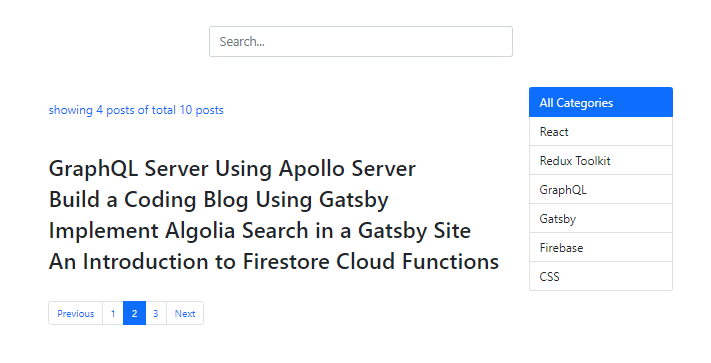
Now, our pagination component functions as expected.