Implement JWT Based User Authentication in a MERN Stack App - Part 2
By Hemanta Sundaray on 2021-05-22
This blog post is part of a series. You must finish part-1 before continuing here.
Full-stack application structure
There are many ways you can structure a full-stack application. The structure that we are going to create below is the one that I use in all my projects.
I created this application on windows. However, you should have no problem following the instructions on macOS.
Create a folder named mern-auth and open it in Visual Studio Code or any other code editor of your choice. By the way, if you have not tried VS code yet, I highly encourage you to give it a try.
You can open an integrated terminal inside VS code using the keyboard shortcut Ctrl+` (with the backtick character). This is convenient as you don’t have to switch between windows.
Inside mern-auth, create a React project called client.
PS C:\Users\Delhivery\Desktop\mern-auth> npx create-react-app clientIf you have previously installed
create-react-appglobally vianpm install -g create-react-app, it is recommended that you uninstall the package usingnpm uninstall -g create-react-appto ensure that npx always uses the latest version. npx comes with npm 5.2+ and higher.
Next, inside mern-auth, create a folder named server.
PS C:\Users\Delhivery\Desktop\mern-auth> mkdir serverAt this stage, inside mern-auth, we have two folders - client & server. What’s more, create-react-app has already initialized the client folder as a Git repository by default. If you cd into the client folder, you can see the .git sub-folder (hidden) using the following command:
PS C:\Users\Delhivery\Desktop\mern-auth\client> ls -Fo
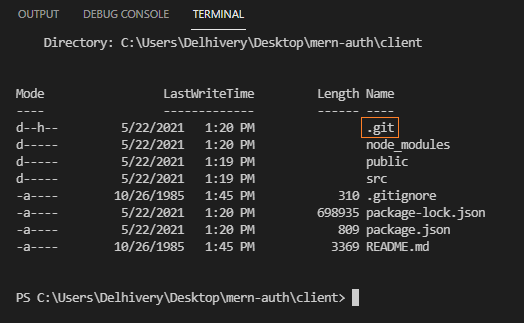
We will also see a .gitignore file inside the client folder.
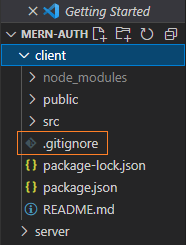
Because we are building a full-stack application, we want to initialize the root folder (mern-auth) as a Git repository, not the client folder.
Therefore, we have to uninitialize the client folder as a Git repository by removing the .git sub-folder inside it. We can to do so using the following command:
PS C:\Users\Delhivery\Desktop\mern-auth\client> rm ./.git -ForceAfter executing the command, you will receive the following prompt.
Confirm
The item at C:\Users\Delhivery\Desktop\mern-auth\client\.git has children and the Recurse parameter was not specified. If you continue, all children will
be removed with the item. Are you sure you want to continue?
[Y] Yes  [A] Yes to All  [N] No  [L] No to All  [S] Suspend  [?] Help (default is "Y"):
Type Y and hit enter. The .git subdirectory will be deleted.
Next, move the .gitignore file from the client folder to the mern-auth folder.
Inside the .gitignore file, change /node_modules to **/node_modules. This will ensure that the node_modules folder in the current folder and all the sub-folders will be ignored.
Now, generate a package.json file inside the mern-auth folder using the following command:
PS C:\Users\Delhivery\Desktop\mern-auth> npm init -yThe package.json file is the manifest for our project and will include all the packages that our application depends on. You can generate a package.json file without having it ask you any questions with a -y flag.
Now, your folder structure should look like the following:
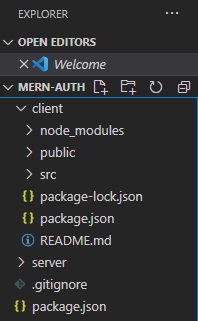
Let’s also initialize the mern-auth folder as a Git repository.
PS C:\Users\Delhivery\Desktop\mern-auth> git initI highly recommend that you push the local repository to a remote repository such as GitHub and do commits at regular intervals.
Our application structure is now ready.
Go to part-3