How to Build an Express/GraphQL Server - Part 2?
By Hemanta Sundaray on 2021-06-06
This blog post is part of a series. You must finish part-1 before continuing here.
GraphQL schema
Because the shape of a GraphQL query closely matches the result, you can predict what the query will return without knowing that much about the server. But it's useful to have an exact description of the data we can ask for - what fields can we select? What kinds of objects might they return? What fields are available on those sub-objects? That's where the schema comes in.
Every GraphQL service defines a set of types which completely describe the set of possible data you can query on that service. Then, when queries come in, they are validated and executed against that schema.
Defining a UserType
Inside the server directory make a file named schema.js and paste the following code.
const graphql = require("graphql");

const { GraphQLString, GraphQLObjectType, GraphQLInt } = graphql;

const UserType = new GraphQLObjectType({
  name: "User",
  fields: {
    id: { type: GraphQLString },
    firstName: { type: GraphQLString },
    age: { type: GraphQLInt },
  },
});LINE-1: We have required in the graphql library.
LINE-5: We have created a new object called UserType using GraphQLObjectType to instruct GraphQL about the presence of a user in our application. The user has three properties: id, firstName & age.
UserType informs GraphQL what a user object looks like.
The object we pass in to GraphQLObjectType has 2 required properties: name & fields
- name: The
nameproperty will always be a string that describes the type that we are defining. By convention, we capitalize the first letter of the value of thenameproperty. - fields: The second required property is the
fieldsproperty whose value is an object. With thefieldsproperty we tell GraphQL that every user will have anid,firstNameandageproperty. We also tell GraphQL about the type of those fields by setting the values of each of these properties to an object and then defining atypeproperty.
Defining a root query
We have defined the data type of a user in our schema file. It’s UserType.
Now we will define a root query that will allow us to jump and land on a specific node in our graph of data. We can think of the root query as an entry point to our data.
If we want to find a user, let's say, with an id of 23, we are going to pass that instruction to the root query. The root query will contain some logic that will tell the root query where to jump to inside the graph.
Update the schema.js file with the following code snippet.
const graphql = require("graphql")

const { GraphQLString, GraphQLObjectType, GraphQLInt } = graphql

const UserType = new GraphQLObjectType({
  name: "User",
  fields: {
    id: { type: GraphQLString },
    firstName: { type: GraphQLString },
    age: { type: GraphQLInt },
  },
})

const RootQuery = new GraphQLObjectType({
  name: "RootQueryType",
  fields: {
    user: {
      type: UserType,
      args: { id: { type: GraphQLString } },
      resolve(parentValue, args) {
      },
    },
  },
});
On line 14, we have declared a new variable called RootQuery. We have passed two properties - name & fields - to GraphQLObjectType.
The RootQuery is essentially saying that if you are looking for a user and you give me an id, I will give back to you a user.
The resolve() function is where we enter into our database and actually find the data we are looking for. It's job is to actually reach out to a database or a third party API and fetch the data.
We will understand the usage of parentValue (first argument to the resolve() function) later on in the series.
The second argument passed to the resolver function is args. This is an object that gets called with whatever arguments we have passed to the original query. In other words, if our query is expected to be provided with an id of the user that we are trying to fetch, that id will be present in the args object.
Defining a datastore
We will not use any database here. To keep things simple, we will hard code a list of users. Then, inside the resolve() function, we will write a simple logic that will instruct GraphQL to search through the list of users and return a user whose id matches the id in the query.
Update the schema.js file as follows:
const graphql = require("graphql");
const _ = require("lodash");

const { GraphQLString, GraphQLObjectType, GraphQLInt } = graphql;

const users = [
  { id: "12", firstName: "Bill", age: "35" },
  { id: "20", firstName: "Seth", age: "25" },
];

const UserType = new GraphQLObjectType({
  name: "User",
  fields: {
    id: { type: GraphQLString },
    firstName: { type: GraphQLString },
    age: { type: GraphQLInt },
  },
});

const RootQuery = new GraphQLObjectType({
  name: "RootQueryType",
  fields: {
    user: {
      type: UserType,
      args: { id: { type: GraphQLString } },
      resolve(parentValue, args) {
        return _.find(users, { id: args.id });
      },
    },
  },
});Note: The
RootQueryhas the expectation of receiving anid. So, when anidis provided to the query, it will also be present in theargsobject. This is how, we are able to access theidof the user we are looking for inside the code block of theresolve()function.
Next, we will merge the UserType and the RootQuery into a schema object and pass the schema object to the expressGraphQL middleware.
We are going to import a helper from the graphql library named GraphQLSchema. GraphQLSchema takes in a root query and returns a GraphQL schema instance.
Add the highlighted code snippets in schema.js file.
const graphql = require("graphql")
const _ = require("lodash")

const { GraphQLString, GraphQLObjectType, GraphQLInt, GraphQLSchema } = graphql

const users = [
  { id: "12", firstName: "Bill", age: "35" },
  { id: "20", firstName: "Seth", age: "25" },
]

const UserType = new GraphQLObjectType({
  name: "User",
  fields: {
    id: { type: GraphQLString },
    firstName: { type: GraphQLString },
    age: { type: GraphQLInt },
  },
})

const RootQuery = new GraphQLObjectType({
  name: "RootQueryType",
  fields: {
    user: {
      type: UserType,
      args: { id: { type: GraphQLString } },
      resolve(parentValue, args) {
        return _.find(users, { id: args.id });
      },
    },
  },
});

module.exports = new GraphQLSchema({
  query: RootQuery,
})
Then, import the schema in the index.js file and add it inside the configuration object passed to the expressGraphQL middleware.
const express = require("express");
const expressGraphQL = require("express-graphql").graphqlHTTP;
const schema = require("./schema");

const app = express();

app.use(
  "/graphql",
  expressGraphQL({
    graphiql: true,
    schema,
  })
);

const PORT = 5000;

app.listen(PORT, () => {
  console.log(`Server listening on http://localhost:${PORT}`);
});
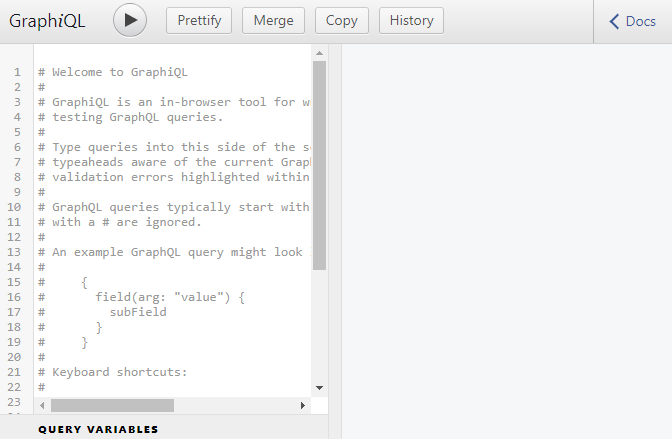
Now if you visit http://localhost:5000/graphql and refresh the page, you should see the GraphiQL interface on the screen.
Go to part-3