Using Worksheet Functions In Excel VBA
By Hemanta Sundaray on 2021-09-11
We can use most of Excel’s worksheet functions in our VBA procedures and extend their functionality.
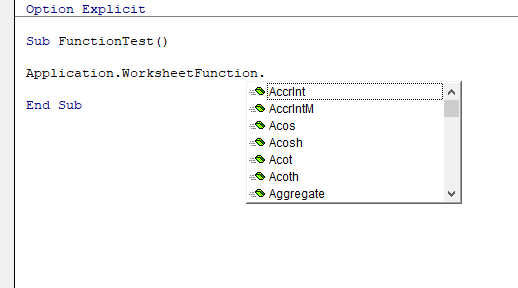
We can see a list of functions we can use by typing Application.WorksheetFunction followed by a period.
The only worksheet functions that we can’t use are those that have an equivalent function. For example, we can’t use Excel’s RAND function (which generates a number) because VBA has an equivalent function: Rnd.
VBA makes Excel’s worksheet functions available through the WorksheetFunction object, which is contained in the Application object. The following is an example of how we can use Excel’s SUM function in a VBA statement:
Total = Application.WorksheetFunction.SUM(Range(“A1:A10”))We can omit either the Application part or the WorksheetFunction part of the expression. The following three expressions all work exactly the same:
Total = Application.WorksheetFunction.SUM(Range(“A1:A10”))

Total = Application.SUM(Range(“A1:A10”))

Total = WorksheetFunction.SUM(Range(“A1:A10”))
Examples:
Finding the average value in a range
The following procedure displays the average value of the range A1:A7.
Sub FindAverage()

    Dim average As Long

    average = WorksheetFunction.average(Range("A1:A7"))

    MsgBox average

End Sub
Using the VLOOKUP function
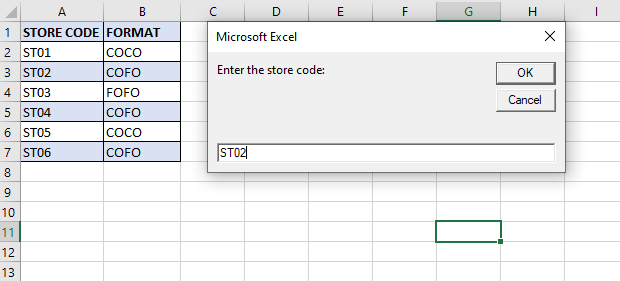
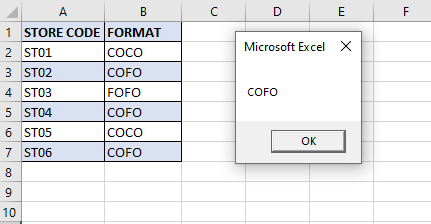
The following example uses VBA’ InputBox & MsgBox functions, plus Excel’s VLOOKUP function. It prompts for a store code and then gets the format from the lookup range A1:B7.
Sub FetchStoreFormat()

    Dim Format As String
    Dim storeCode As String

    storeCode = InputBox("Enter the store code:")

    Worksheets("data").Activate

    Format = Application.WorksheetFunction.VLookup(storeCode, Range("A1:B7"), 2, False)

    MsgBox Format

End Sub