Understanding Modules in Node.js
By Hemanta Sundaray on 2021-05-21
Modules are reusable pieces of code that can be exported from one program and imported for use in another program.
They keep information private and protected from other modules.
module.exports
Every JavaScript file run in Node has a local module object with an exports property used to define what should be exported from the file. Let’s prove this.
Create a file called person.js. Open the file in VS Code. Paste the code below and execute it using the command node person.js.
console.log(module)
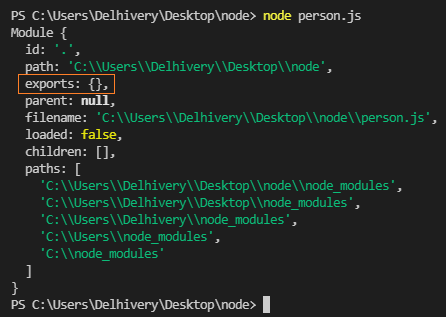
In the output, we see that the module object has an exports property which points to an empty object, because we have not exported anything from the file yet.
Now, let's export an object from the file and execute the file using the command node person.js.
const person = {
    name: ‘hemanta’,
    detail( ) {
      console.log(`My name is ${this.name}`);
    }
};

module.exports = person;

console.log(module);
On line 8, we export the person object as a module. Module is a variable that represents the module, and exports exposes the module as an object.
Now, we can see in the output below that the exports property points to the person object.
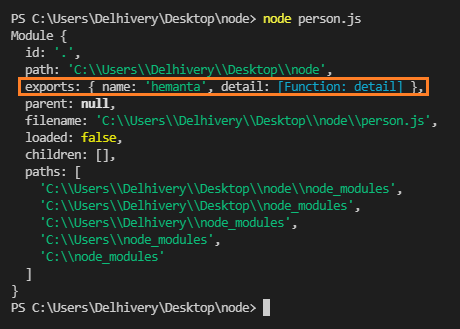
We can also export the person object the following way.
module.exports = {
  name: "hemanta",
  detail() {
    console.log(`My name is ${this.name}`)
  },
}
Here, module.exports exposes the current module as an object.
require()
require() is a JavaScript function that loads a module. It’s argument is the file path of the module.
Use require() to import the module into another file.
Create a file called greeting.js and use require() to import the module.
// the name of the variable is up to you.
const personDetail = require("./person.js")

function greet() {
  console.log(`Bonjour ${personDetail.name}`)
}

greet() // => Bonjour hemanta
Exporting multiple methods & objects
const person = {
  name: "hemanta",
  detail() {
    console.log(`My name is ${this.name}`)
  },
}

function profession() {
  console.log(`${person.name} is a front-end developer.`)
}

const age = 32

exports.personDetail = person
exports.personProfession = profession
exports.personAge = age

console.log(module)
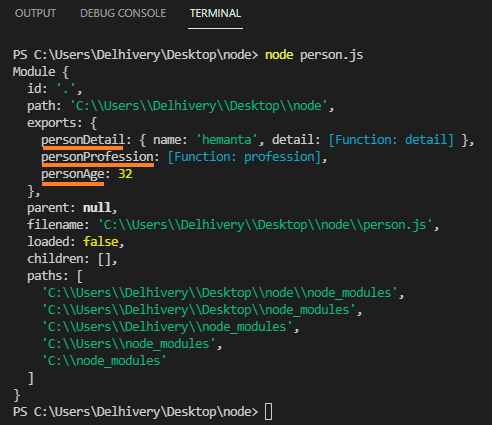
Note that the name of the keys (underlined in orange) are up to us.
Now, we can import the values we want using require().
const { personProfession, age } = require("./person.js")

personProfession() // => hemanta is a front-end developer
On line 1, I have used destructuring to import only the values I want.