Sticky Footer Using Flexbox & Grid
By Hemanta Sundaray on 2021-06-16
Requirement
- Footer sticks to the bottom of the viewport when content is short.
- If the content extends past the viewport bottom, the footer sits below the content as normal.
Using CSS Grid Layout
src/App.js
import React from "react";
const App = () => {
return (
<div className="wrapper">
<header>Header</header>
<main>Dynamic Content. I can grow or shrink as I wish.</main>
<footer>© 2021, All Rights Reserved</footer>
</div>
);
};
export default App;src/index.css
* {
  padding: 0;
  margin: 0;
  box-sizing: border-box;
}

html {
  font-family: sans-serif;
}

.wrapper {
  min-height: 100vh;
  display: grid;
  grid-template-rows: auto 1fr auto;
}

header {
  width: 100%;
  height: 4rem;
  display: grid;
  place-items: center;
  background-color: black;
  color: gray;
  font-size: 2rem;
  font-weight: bolder;
}

main {
  width: 40rem;
  margin: 0rem auto;
  padding: 1rem;
  font-weight: bold;
}

footer {
  width: 100%;
  height: 3rem;
  display: grid;
  place-items: center;
  background-color: black;
  color: gray;
}
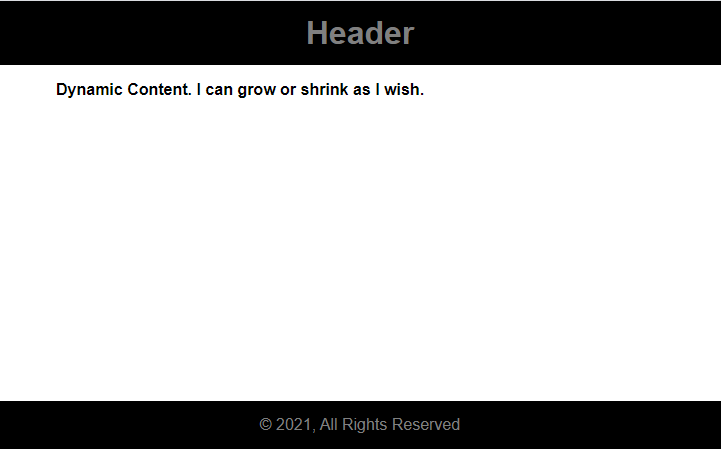
We have placed the main dynamic content in the 1fr track. The 1fr track will take all the available space and will grow to fill the gap.
As we can see, the footer sticks to the bottom of the viewport.
Using Flexbox
We can also create a sticky footer using Flexbox.
src/index.css
* {
  padding: 0;
  margin: 0;
  box-sizing: border-box;
}

html {
  font-family: sans-serif;
}

.wrapper {
  min-height: 100vh;
  display: flex;
  flex-direction: column;
}

header {
  width: 100%;
  height: 4rem;
  display: grid;
  place-items: center;
  background-color: black;
  color: gray;
  font-size: 2rem;
  font-weight: bolder;
  flex-shrink: 0;
}

main {
  width: 40rem;
  margin: 0rem auto;
  padding: 1rem;
  font-weight: bold;
  flex-grow: 1;
}

footer {
  width: 100%;
  height: 3rem;
  display: grid;
  place-items: center;
  background-color: black;
  color: gray;
  flex-shrink: 0;
}
flex-shrink:0 prevents the header and the footer from shrinking smaller when content fills the main araea.