SpecialCells Method in Excel VBA
By Hemanta Sundaray on 2021-09-12
Let’s say we have the following data set:
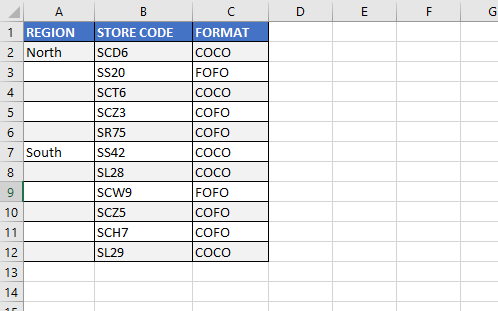
We can fill the missing labels using the Sub procedure below:
Sub FillCellTypeBlanks()

Range("A1").CurrentRegion.SpecialCells(xlCellTypeBlanks).FormulaR1C1 = "=R[-1]C"

Range("A1").CurrentRegion.Value = Range("A1").CurrentRegion.Value

End Sub
Line-3: Range(“A1”).CurrentRegion refers to the contiguous data in the report. The SpecialCells method returns just the blank cells in the range. The formula fills in all the blank cells with a formula that points to the cell above the blank cell.
Line-5: This is a fast way to simulate using the Copy & Paste Special Values commands.