Row & Column Selection in Pandas Using Indexing Operation
By Hemanta Sundaray on 2021-09-05
We can select both rows and columns in Pandas DataFrames using indexing operations.
For all indexing methods, we first provide the row indexer and then the column indexer with a comma separating them.
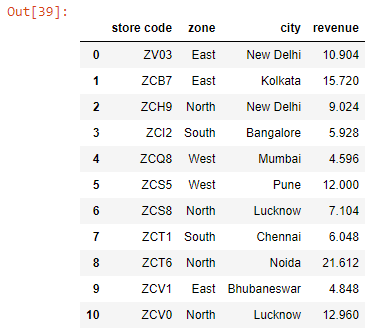
Let’s read an Excel worksheet into a Pandas Dataframe:
import pandas as pd

data = pd.read_excel("budget.xlsx")

data.columns = data.columns.str.lower().str.strip()

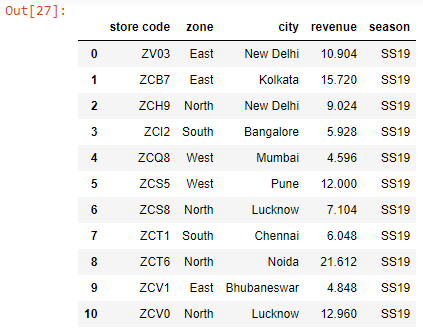
data
Output:
loc[ ]
We use loc[] to subset a Dataframe using label-based lookups.
Syntax
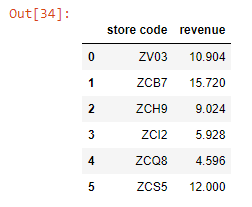
df.loc[row_indexer, column_indexer]data.loc[0:5, ['store code', 'revenue']]Output:
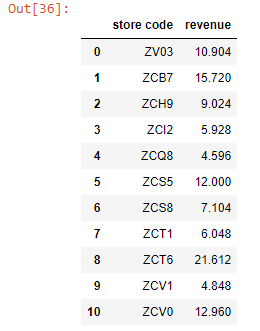
We can select all rows if we use colon (:) as the row indexer.
data.loc[:, ['store code', 'revenue']]Output:
When using loc[], we can slice column names as well.
data.loc[:, 'store code':'revenue']Output
iloc[ ]
We use iloc[] to subset a Dataframe using integer-based lookups.
Note that the integer slicing that iloc[] employs is exclusive of the end index.
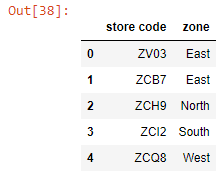
data.iloc[:5, [0, 1, 2]]Output:
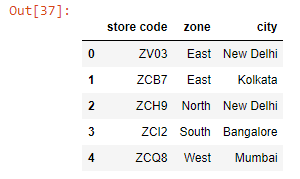
When using iloc[], we can use the slicing syntax for the columns as well.
data.iloc[:5, 0:2]Output: