Row & Column Selection in Pandas Using Chaining
By Hemanta Sundaray on 2021-09-05
Learn more about selecting and adding columns to Pandas Dataframes in my blog post here.
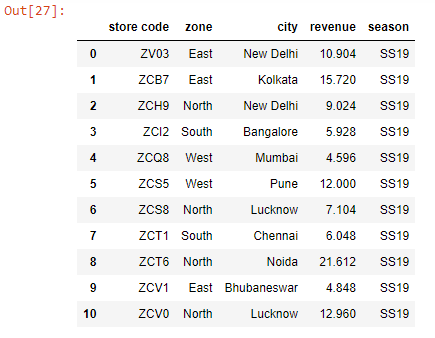
Let’s first read an Excel worksheet into a Pandas Dataframe:
import pandas as pd

data = pd.read_excel("budget.xlsx")

data.columns = data.columns.str.lower().str.strip()

data
Output:
We can select both rows and columns using chaining as shown below:
data[1:5][['store code', 'revenue']]Output:
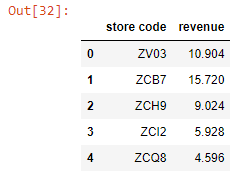
First, we selected the store code & revenue columns for all rows and then we pulled out rows with indices 0, 1, 2, 3 & 4.
Note that column and row selection order does not matter.
data[['store code', 'revenue']][:5]Output: