Reading Excel Files Using Pandas
By Hemanta Sundaray on 2021-08-05
Reading an Excel file with a single worksheet
Let’s say we have an Excel file named sales.xlsx and the file contains a single worksheet named Data.
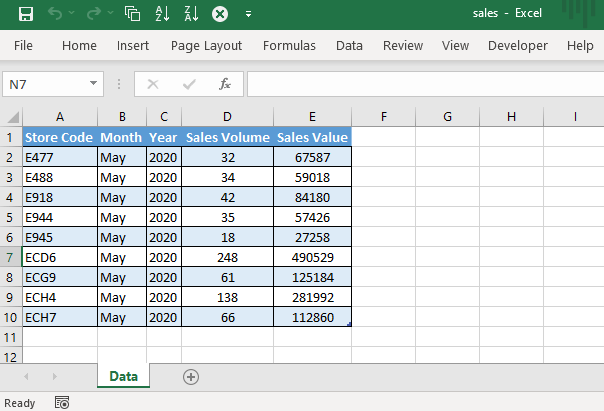
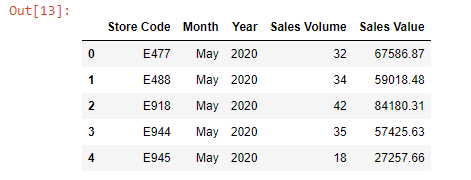
We can read the data inside the file into a DataFrame using the read_excel() method as shown below:
import pandas as pddf = pd.read_excel("sales.xlsx")
df.head()
Reading an Excel file with multiple worksheets
Let’s say we have an Excel file named budget.xlsx and the file contains 2 worksheets: ZoneWise & LineWise.
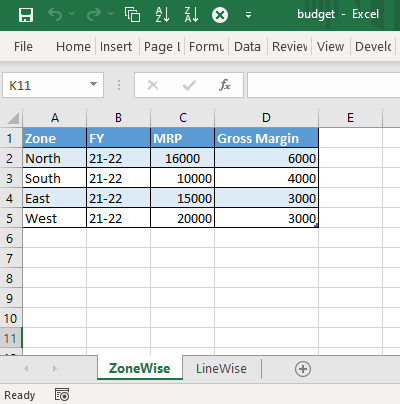
If we read the data inside the file, pandas, by default, will read the first sheet: ZoneWise.
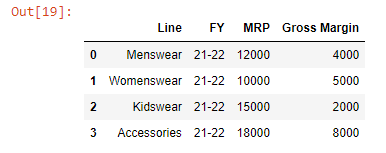
But what if we want to read the LineWise sheet?
We can do so by passing the name of the second sheet to the sheet_name parameter, as shown below:
df = pd.read_excel("sales.xlsx", sheet_name="LineWise")
df.head()
We can read both the sheets inside the budget.xlsx file by passing the sheet names inside a list object to the sheet_name parameter.
budget = pd.read_excel("budget.xlsx", sheet_name=["ZoneWise", "LineWise"])
budget
The result is going to be a dictionary.
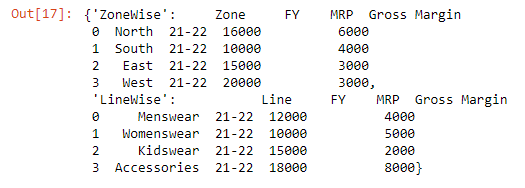
As we can see, the keys of the dictionary are the names of the worksheets.
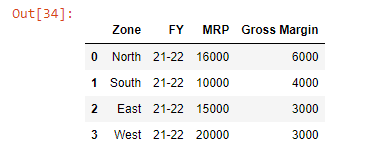
We can read a specific worksheet as follows:
budget["ZoneWise"]
What if we have hundreds of worksheets in the file?
Then, writing the names of the worksheets manually is not a feasible option. In such cases, we can pass the value of None to the sheet_name parameter.
budget = pd.read_excel("budget.xlsx", sheet_name= None)