Pandas Series - Split Strings by Characters
By Hemanta Sundaray on 2021-08-15
Let’s read the budget.xlsx file into a DataFrame:
import pandas as pd

data = pd.read_excel("budget.xlsx")

data
Output:
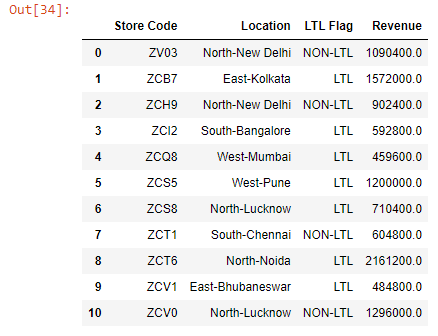
The values in the Location column are made up of the zone and the city that a particular store is located at.
Let’s say we want to split the values in the Location column into two parts. We can do so using the Series.str.split() method.
Note that the words are divided by a dash(-), which is the delimiter around which we will split the values.
data["Location"].str.split("-")Output:
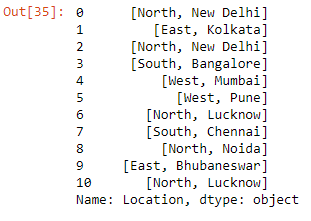
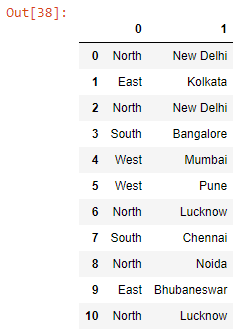
We can expand the split strings into different columns by passing expand=True to the split() method. This will return a DataFrame with 2 columns.
data["Location"].str.split("-", expand=True)Output:
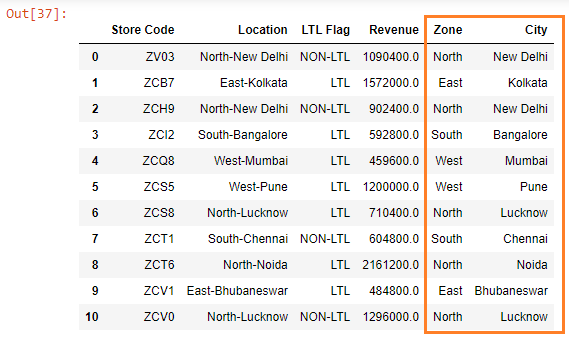
Next, if we want to create 2 new columns - Zone and City - and assign them the columns of the newly Created DataFrame, we can do so using the following code snippet:
data["Zone"] = data["Location"].str.split("-").str.get(0)

data["City"] = data["Location"].str.split("-").str.get(1)

data
The .str.get(0) method extracts the column located at position 0 and .str.get(1) extracts the column located at position 1.
Output: