Memory Optimization in Pandas DataFrames
By Hemanta Sundaray on 2021-08-09
Let’s read an Excel file into a DataFrame:
import pandas as pd

nsv = pd.read_excel("./NSV/PA/August/PA-AUGUST-19.xlsx", sheet_name = "Data")

nsv.info()
Output:
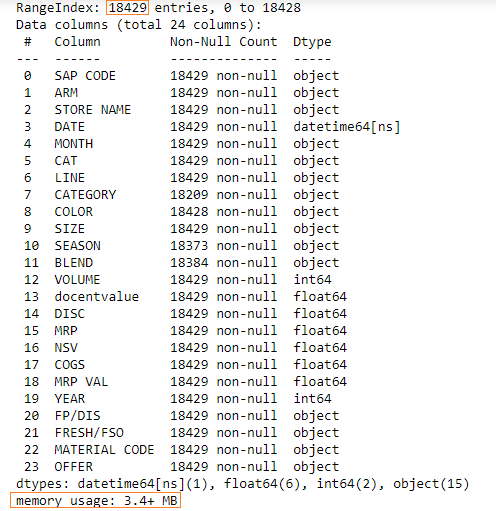
We have 18429 rows in our DataFrame and the memory usage is 3.4+ MB.
We can employ a method to optimize memory usage.
We will have to find the columns where there are a few unique values and then convert those columns to categorical data type.
The following columns have a few unique values:
- ARM
- LINE
- SEASON
We can check the unique values in a column using the nunique() method.
Learn how to count unique values in a column in my blog post here.
nsv["ARM"].nunique()
7

nsv["LINE"].nunique()
7

nsv["SEASON"].nunique()
14
Let’s convert these columns to categorical data types.
nsv["ARM"] = nsv["ARM"].astype("category")

nsv["LINE"] = nsv["LINE"].astype("category")

nsv["SEASON"] = nsv["SEASON"].astype("category")
Let’s check the memory usage now:
nsv.info()Output:
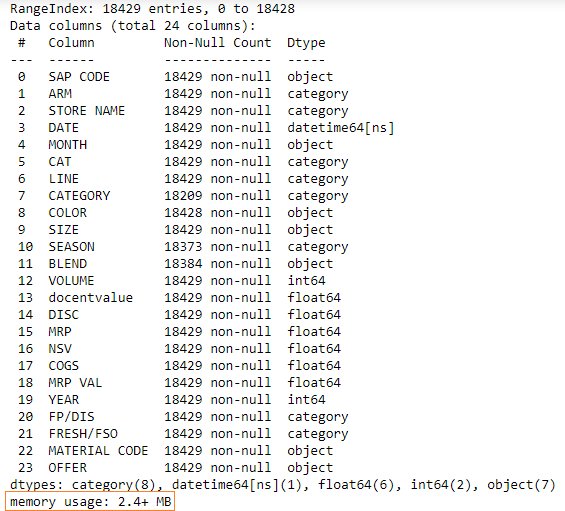
The new memory usage is 2.4MB, which is a reduction of approximately 30%.