Join Pandas DataFrames With The join() Method
By Hemanta Sundaray on 2021-08-11
I have an Excel workbook named budget.xlsx, which has two worksheets: sheet1 & sheet2.
Let’s read both the worksheets into DataFrames:
import pandas as pd

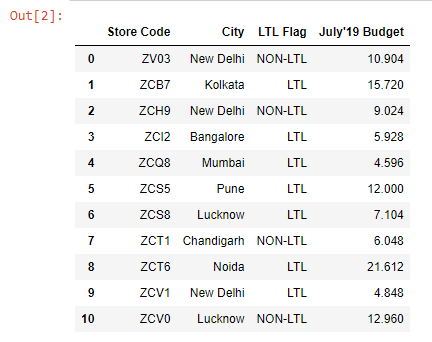
budget1 = pd.read_excel("budget.xlsx", sheet_name="sheet2").drop_duplicates()

budget1
Output:
budget2 = pd.read_excel("budget.xlsx", sheet_name="sheet1").drop_duplicates()

budget2
Output:
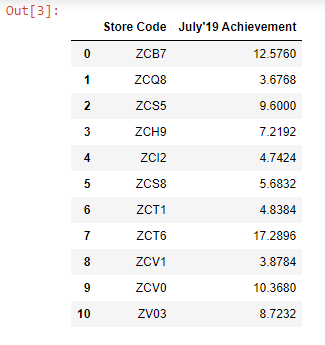
Note that both the DataFrames have the Store Code column in common.
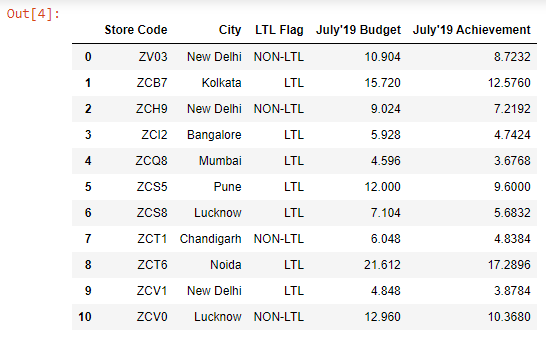
Our goal is to join the July’19 Achievement column from the budget2 DataFrame to the budget 1 DataFrame.
We can do so using the join() method.
The Store Code column, present in both the DataFrames, will act as the key for the joining operation.
budget1.set_index(keys="Store Code").join(budget2.set_index(keys="Store Code")).reset_index()Learn how to convert a column into an index in my blog post here.
Output: