GraphQL Concepts Explained - Query
By Hemanta Sundaray on 2021-06-12
There are three types of GraphQL operations: query, mutation & subscription.
A query describes the data you want to fetch from a GraphQL server. It is written using the GraphQL query language and is sent to the server as a string inside a JSON object.
Syntax
- We can write a query using a shorthand syntax where we omit the keyword query (operation type) and the name of the query (operation name).
{
  user {
   firstName
   age
  }
}- We can also write a query by using the keyword
querybut omitting the name of the query.
query {
  user {
    firstName
    age
  }
}- However, it’s always a good practice to write a query using both the keyword
queryand the name of the query. That way, we can easily identify a query - especially useful for debugging our code. Below,fetchUsersis the name of our query.
query fetchUsers {
   user {
     firstName
     age
   }
}
Selection set
When we write a query, we select the fields we need by encapsulating them in curly braces. These blocks are referred to as selection sets.
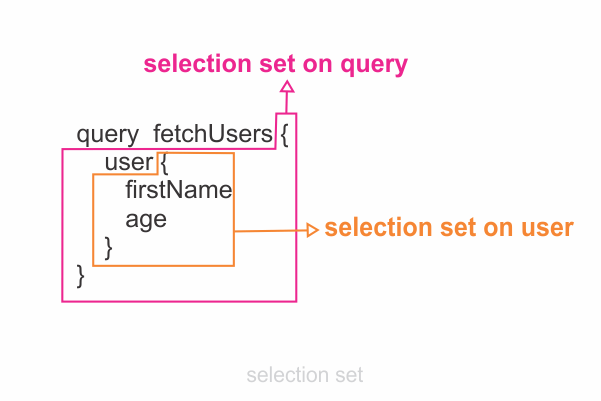
When a query gets executed successfully, the response becomes available as a JSON object as the value of the data key. The response has exactly the same shape as the query. The shape of the response data is exactly shaped after the structure of fields being requested in the query.
Query Arguments
query fetchUsers {
   user (id: “30”) {
     firstName
     age
   }
}
We can filter the results of a GraphQL query by passing arguments to fields. An argument is a set of key-value pairs attached to a specific field. Arguments can appear on any field, even on fields nested deep inside an operation. Above, we want to fetch a user with an id of 30.
Parts of a query
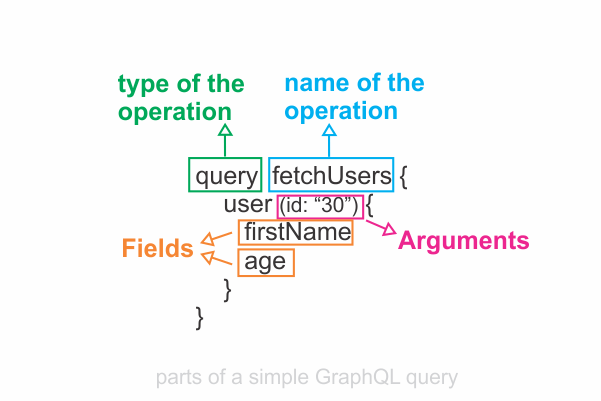
A field is a unit of data you ask for. The field ends up as a field in the response data we receive from the server.
Fragments
Fragments are selection sets that can be used in multiple operations.
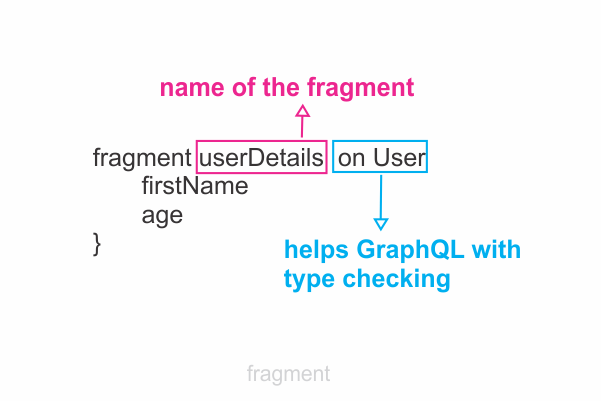
We define fragments by using the fragment keyword followed by the name of the fragment. Fragments are selection sets on specific types. Therefore, in the definition, we must also specify the type associated with the fragment.
query fetchUsers {
    user (id: "40") {
        ...userDetails
    }
}

fragment userDetails on User {
    firstName
    age
}
Above, the fragment is a selection set on the User type.
We can add a fragment in another selection set by using three dots(...) followed by the name of the fragment (line 3). The three dots instruct GraphQL to assign the fields from the fragment to the current selection set.
The syntax is similar to the JavaScript spread operator.
Want to learn how to build an Express/GraphQL server?
Check out my 8-part blog series here.