For-Next Loop in Excel VBA
By Hemanta Sundaray on 2021-09-05
We can repeatedly execute a block of VBA statements using loops.
For-Next
A For...Next loop is controlled by a counter variable that starts at one value and stops at another value. All the VBA statements between the For and Next statements get repeated in the loop.
In the Sub procedure below, we add all the odd numbers between 1 to 10.
Sub SumOddNumbers()

Dim Total As Long
Dim i As Long

Total = 0

For i = 1 To 10
    ' Check if i is divisible by 0
    If i Mod 2 <> 0 Then
        Total = Total + i
    End If
Next i

Debug.Print Total

End Sub
Learn about equality & inequality operators in my blog post here.
Learn how to control program flow in Excel VBA in my blog post here.
For-Next with a Step
We can use a Step value to skip some counter values in a For-Next loop.
Let’s say we have the following data set in an Excel worksheet.
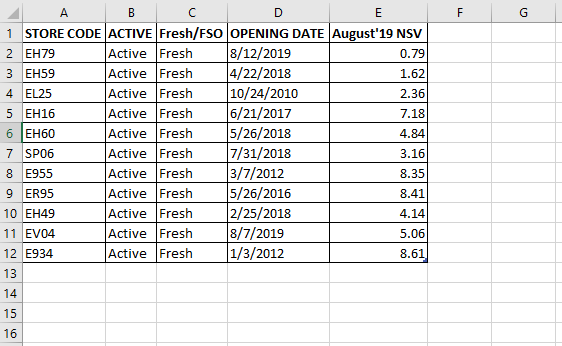
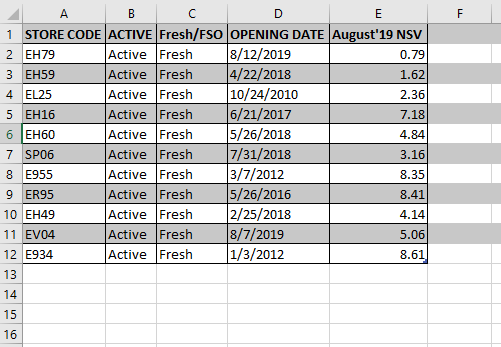
We can color alternate rows of the data set using the code snippet below:
Sub ColorAlternateRows()

Dim i As Long
Dim lastRow As Long

lastRow = Cells(Rows.Count, 1).End(xlUp).Row

For i = 1 To lastRow Step 2
    Rows(i).Interior.Color = RGB(200, 200, 200)
Next i

End Sub