For Each-Next Loop in VBA
By Hemanta Sundaray on 2021-09-11
We can loop through each object in a collection of objects using a For Each-Next loop.
The following example loops through each worksheet in the active workbook and deletes the worksheet if its empty.
Sub DeleteEmptySheets()

Dim ws As Worksheet

Application.DisplayAlerts = False

For Each ws In ActiveWorkbook.Worksheets
    If WorksheetFunction.CountA(ws.Cells) = 0 Then
        ws.Delete
    End If
Next ws

Application.DisplayAlerts = True

End Sub
Note: With the
DisplayAlertssetting turned off, Excel will not display a warning, every time a sheet is about to be deleted.
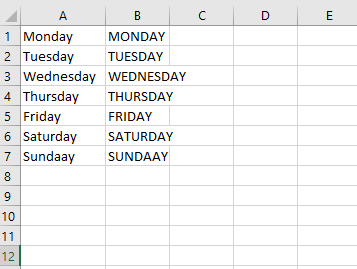
The following example loops through the cells in the range A1:A7, converts the cell value to uppercase letters and then assigns that value to the value of the cell to the right.
Sub UpperCase()

Dim cell As Range

For Each cell In Range("A1:A7")
    cell.Offset(0, 1).Value = UCase(cell.Value)
Next cell

End Sub