Find Values Within a Range in a Pandas Series
By Hemanta Sundaray on 2021-08-10
Let’s read the sales.xlsx workbook into a DataFrame.
import pandas as pd

sales = pd.read_excel("sales.xlsx")

sales
Output:
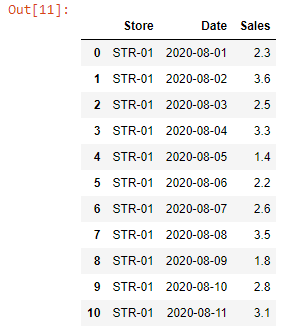
Let’s say we want to find out the sales in the first week of August, 2020 (i.e. between 1stAugust’20 to 7th August’20).
We can get the desired result using the between() method.
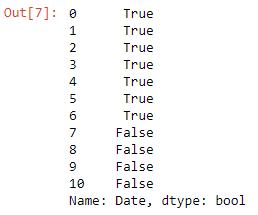
condition = sales["Date"].between("2020-08-01", "2020-08-07")

condition
The between() method returns a boolean Series. Moreover, both the values passed to the method are inclusive.
Output:
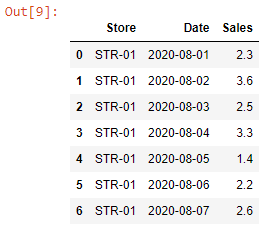
Next, we pass the condition variable inside the squared brackets to get the filtered DataFrame.
sales[condition]Output: