Find Duplicate Rows in a Pandas DataFrame
By Hemanta Sundaray on 2021-08-08
Let’s read the budget.xlsx file into a DataFrame.
import pandas as pd

budget = pd.read_excel("budget.xlsx")

budget
Output:
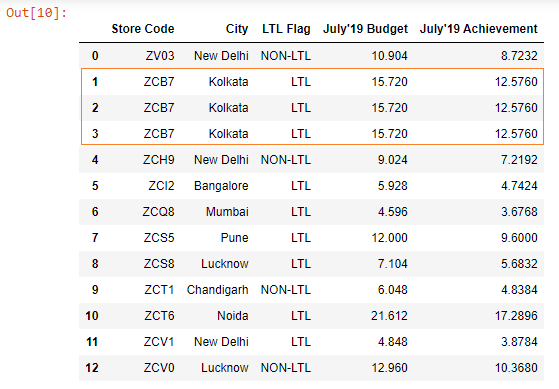
We can see that we have duplicate rows in our DataFrame.
We can extract these duplicate rows using the duplicated() method.
duplicates = budget.duplicated()

duplicates
The duplicated() method returns a boolean Series.
Output:
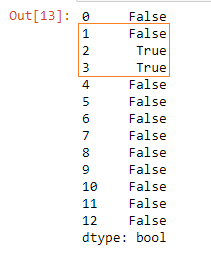
Note that the first occurrence of the row is marked as False (i.e. non-duplicate).
Next,we extract the duplicate rows as shown below:
budget[duplicates]Output:
