Filter a Pandas DataFrame Based on a Condition
By Hemanta Sundaray on 2021-08-08
Single Condition
Let’s read an Excel file into a DataFrame:
import pandas as pd

budget = pd.read_excel("budget.xlsx").fillna(value = 0)

budget
Output:
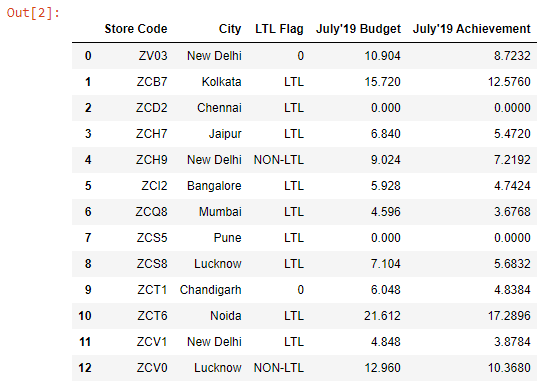
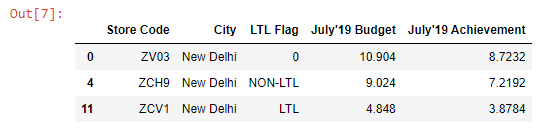
Let’s say we want to extract the stores that are located in New Delhi.
We can filter the DataFrame in 2 steps:
- Step-1: Write the filter condition.
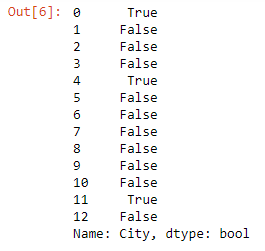
condition = budget["City"] == "New Delhi"

condition
The result is a new boolean Series.
Output:
- Step-2: Pass the condition in square brackets that follow the name of the DataFrame
budget[condition]Output:
Multiple conditions
Let’s say we want to extract the stores that are flagged as LTL and have July’19 budget numbers greater than 10.
We can achieve this using the & logical operator in Pandas.
condition1 = budget["LTL Flag"] == "LTL"

condition2 = budget["July'19 Budget"] > 10

budget[condition1 & condition2]
Output:

Next, let’s say we want to extract stores that are located either in Mumbai or Bangalore.
We can achieve this using the | (vertical pipe) logical operator in Pandas.
condition1 = budget["City"] == "Mumbai"

condition2 = budget["City"] == "Bangalore"

budget[condition1 | condition2]
Output:
