Fill in Null Values in a Pandas DataFrame Using the fillna() Method
By Hemanta Sundaray on 2021-08-07
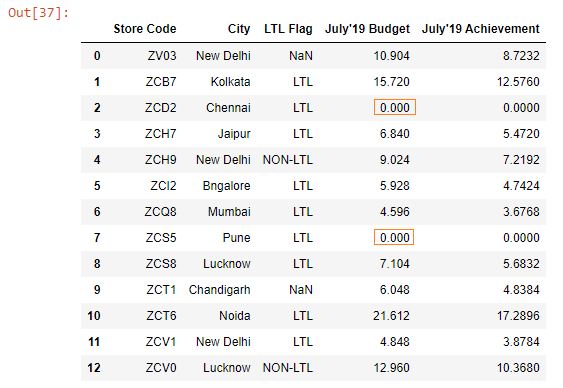
Below, we have read the budget.xlsx file into a DataFrame.
import pandas as pd

budget = pd.read_excel("budget.xlsx")

budget
Output:
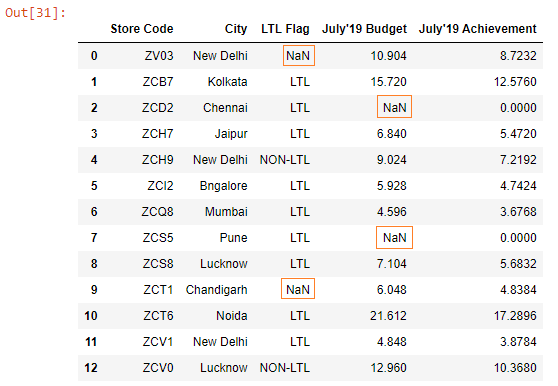
We can see that there are missing values in the LTL Flag and the July’19 Budget columns.
Let’s call the fillna() method on the budget DataFrame.
budget.fillna(value = 0, inplace = True)

budget
Output:
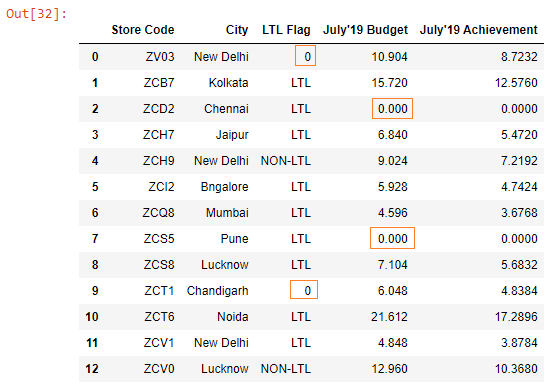
The missing values in both the columns have been filled with 0. The value 0 in the July’19 Budget column makes sense, but not in the LTL Flag column.
Let’s say we want to fill the missing values in the July’19 Budget column with 0 & in the LTL Flag column with the value Not Available.
How can we fill missing values in different columns with different values?
We can achieve this by passing a Python Dictionary to the value parameter.
values = {"LTL Flag" : "Not Available", "July'19 Budget" : 0}

budget.fillna(value = values, inplace = True)

budget
The keys in the dictionary are the column names where we want to fill the missing values in and the values in the dictionary are the values that we want the missing values to be filled with.
Output:
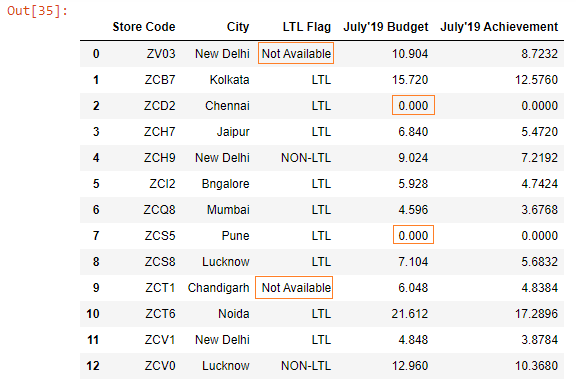
Note that the fillna() method can be called either on a DataFrame or a Series.
Let’s fill the missing values only in the July’19 Budget column with 0.
budget["July'19 Budget"].fillna(value = 0, inplace = True)
budget
Output: