Dynamic Arrays in Excel VBA
By Hemanta Sundaray on 2021-09-12
A dynamic array doesn’t have a preset number of elements.
We can declare a dynamic array with an empty set of parentheses:
Dim DynamicArray () As IntegerBefore we can use this array, we must use the ReDim statement to tell VBA how many elements the array has.
Usually, the number of elements in the array is determined while our code is running. We can use the ReDim statement any number of times, changing the array’s size as often as needed.
The following example demonstrates how to change the number of elements in a dynamic array. It assumes that the NumElements variable contains a value, which our code calculated.
ReDim DynamicArray (1 To NumElements)When we redimension an array using ReDim, we wipe out any values currently stored in the array elements. We can avoid destroying the old values by using the Preserve keyword.
The following example shows how you can preserve an array’s values when you redimension the array:
ReDim Preserve DynamicArray (1 To NumElements)If DynamicArray currently has ten elements, and we execute the preceding statement with NumElements equaling 12, the first ten elements remain intact, and the array has room for two additional elements (up to the number contained in the variable NumElements). If NumElements equals 7 however, the first seven elements are retained but the remaining three elements meet their demise.
Example:
Sub DynamicArrayDemo()

Dim LastRow As Long

LastRow = Cells(Rows.Count, 1).End(xlUp).Row

Dim i As Long

Dim StoreCode() As String 'Declare a dynamic array named StoreCode

For i = 1 To LastRow
    ReDim Preserve StoreCode(LastRow) As String
    StoreCode(i - 1) = Cells(i, 1).Value
Next i

Range(Cells(1, 5), Cells(1, 5 + LastRow)) = StoreCode

End SubLine-9: We create a dynamic array named StoreCode using an empty set of parantheses.
Line-11 to 14: We decide the number of elements the StoreCode array will hold inside the For-Next loop using the ReDim keyword. (can you figure out what will happen if we remove the Preserve keyword? ) Then we loop through the range in column A using the For-Next loop and populate the StoreCode array with the values from the range.
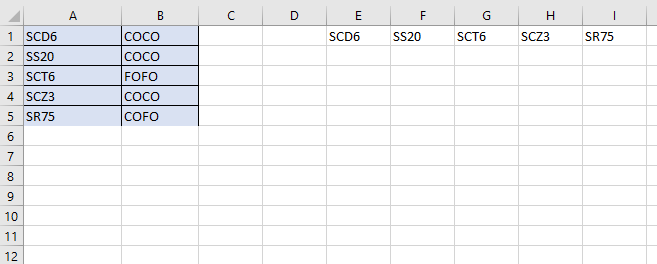
Line-16: Next, we paste the elements stored in the StoreCode array in the range that starts with the cell E1. The last cell of the range is determined dynamically based on the value of the LastRow variable, which changes based on the number of store codes in column A.
Result:
Executing the Sub procedure above gives us the following result: