Delete Rows With Null Values in a Pandas DataFrame
By Hemanta Sundaray on 2021-08-07
Below, we have read the budget.xlsx file into a DataFrame.
import pandas as pd

budget = pd.read_excel("budget.xlsx")
budget
Output:

We can see that we have two rows with missing values. The 3rd row (index no 2) has one missing value, while the 12th row (index no 11) has all missing values.
Pandas, by default, marks missing values as
NaN.
dropna( )
The dropna() method will drop the rows where at least one element is missing.
budget.dropna(inplace = True)
budget
We pass inplace = True in order to make the changes to the DataFrame permanent.
Output:

As we can see, both the 3rd and the 12th rows have been removed.
What if we want to drop rows only where all elements are missing? In other words, what if we want to remove only the 12th row?
We can do so by passing a value of all to the how parameter in the dropna() method.
In the
dropna()method, the default value of thehowparameter isany.
budget.dropna(how = "all", inplace = True)
budget
Output:
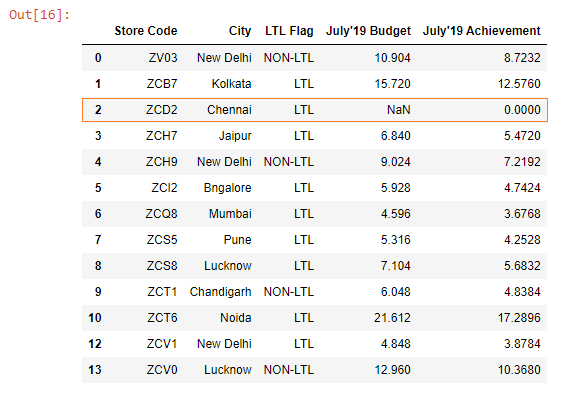
As we can see the 12th row where all values were missing has been removed; however, the 3rd row where only one value is missing remains in the DataFrame.