Creating Spreadsheet Style Pivot Tables in Pandas
By Hemanta Sundaray on 2021-08-09
We can create spreadsheet style pivot tables in pandas using the pivot_table() method.
I have an Excel workbook named budget.xlsx:
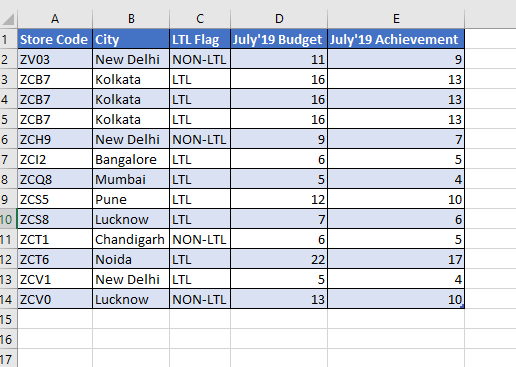
If I need to find out the July’19 Budget numbers both city-wise and LTL Flag-wise, I can create a pivot table as shown below:
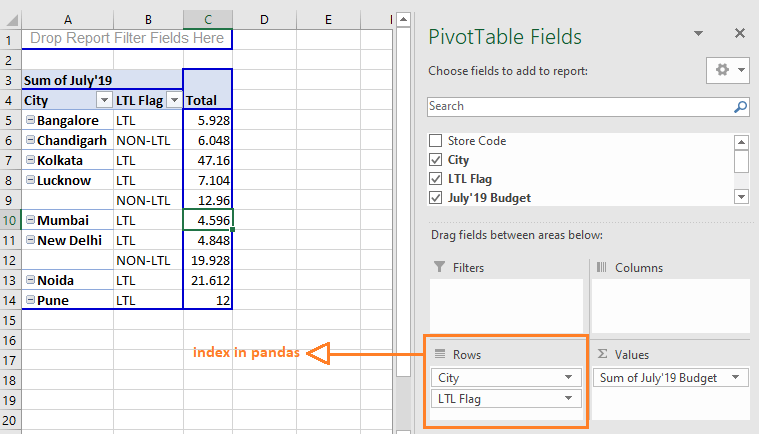
We will recreate the exact pivot table in pandas.
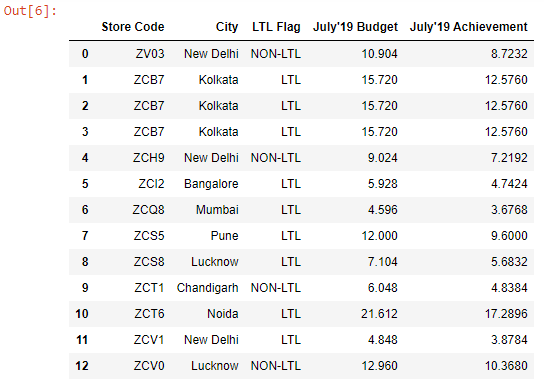
First, let’s read the budget.xlsx file into a DataFrame:
import pandas as pd

budget = pd.read_excel("budget.xlsx")

budget
Output:
Next, let's create the pivot table.
pd.pivot_table(data=budget, index = ["City", "LTL Flag"], values="July'19 Budget", aggfunc="sum").fillna(value="N/A")Output:
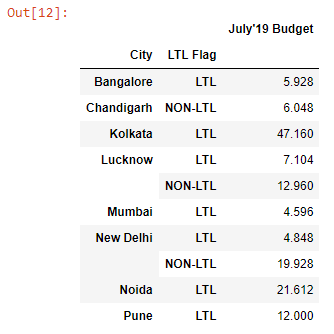
The only thing you have to remember is that whatever you pass to the rows field in Excel is what you pass to the index parameter in the pivot_table method.
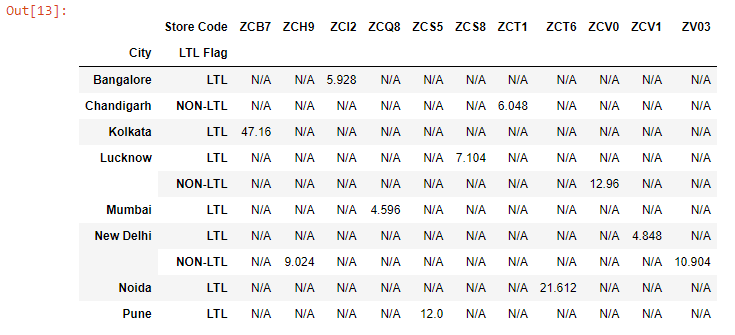
Let’s pass the Store Code column to the columns parameter.
pd.pivot_table(data=budget, index = ["City", "LTL Flag"], columns="Store Code", values="July'19 Budget", aggfunc="sum").fillna(value="N/A")Output: