Count the Unique Values in a Column in a Pandas DataFrame
By Hemanta Sundaray on 2021-08-08
value_counts()
We can return counts of unique values in a column using the value_counts() method.
Below, we have read an Excel file into a DataFrame.
import pandas as pd

budget = pd.read_excel("budget.xlsx")

budget
Output:
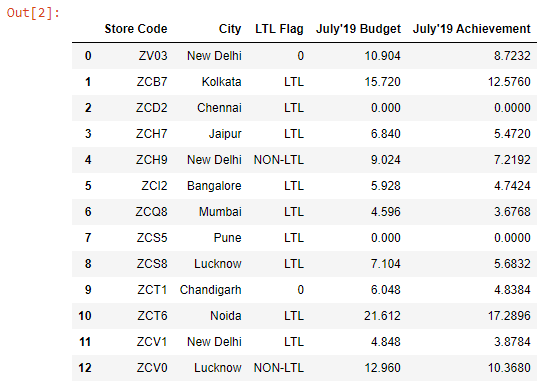
Let's count the unique values in the LTL Flag column:
budget["LTL Flag"].value_counts()Output:

unique()
If we want to find out the unique values (including NaN) in a column without the count, we can use the unique() method.
budget["LTL Flag"].unique()

array([nan, 'LTL', 'NON-LTL'], dtype=object)
nunique()
We can find out the total count of unique values in a column using the nunique() method. nunique() by default, does not count null values. So, we pass dropna = False to count the null values as well.
budget["LTL Flag"].nunique(dropna = False)

3