Comments in Excel VBA
By Hemanta Sundaray on 2021-09-04
In VBA, we can create a comment using an apostrophe (') followed by the comment.
' Declares a Sub procedure named Greeting
Sub Greeting()

' Declares a string variable named name
Dim name As String

' Assigns the return value of the InputBox function to name
name = InputBox(Prompt:="What is your name?")

' Calls the MsgBox function
MsgBox "Welcome " & name

' Ends the Sub procedure
End Sub
We can also comment and uncomment code blocks using the Comment Block and Uncomment Block buttons on the Edit toolbar.
Function CalculateBonus(profit)

If profit >= 0.1 Then
CalculateBonus = 50000

Else
CalculateBonus = 0

End If

End Function
Let’s say we want to comment out the statements on lines 6 & 7. We can easily do this by placing an apostrophe at the start of each of those lines. An easier way to achieve this would be to use a feature in VBA called Comment Block.
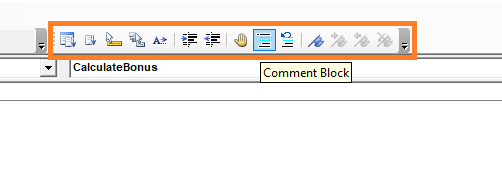
The Comment Block button is available on the Edit toolbar, which is highlighted in orange. The Comment Block button is next to the hand symbol.
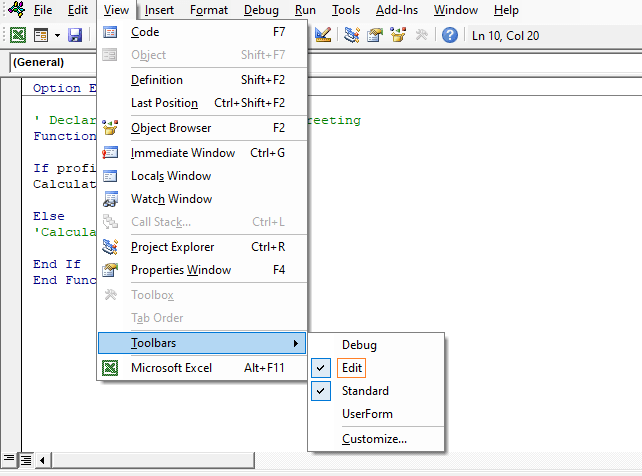
If you can’t see the Edit toolbar in the Visual Basic Editor, then you can activate it by going to View > Toolbars > Edit.
All we need to do is select the lines we want to comment out and then click on the Comment Block button. Conversely, we can uncomment the lines by selecting them and clicking on the Uncomment Block button. (The Uncomment Block button is the button next to the Comment Block button.)