Combine Multiple DataFrames Using The Concat() Method
By Hemanta Sundaray on 2021-08-09
Let’s read 3 Excel files into 3 DataFrames:
import pandas as pd

salesJan = pd.read_excel("salesJan.xlsx")

salesFeb = pd.read_excel("salesFeb.xlsx")

salesMarch = pd.read_excel("salesMarch.xlsx")
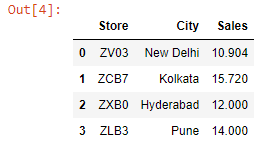
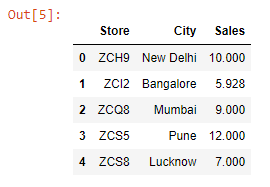
Let’s preview these DataFrames:
salesJanOutput:
salesFebOutput:
salesMarchOutput:
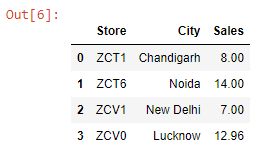
Notice that all three DataFrames have the same three columns (Store, City, Sales), and the columns are in the same order.
We can combine the 3 DataFrames using the concat() method by passing them inside a Python List.
pd.concat([salesJan, salesFeb, salesMarch])Output:
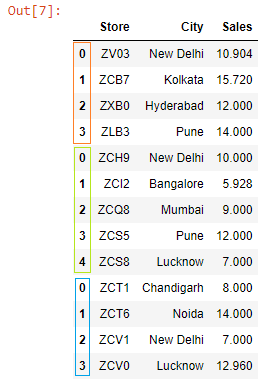
As highlighted above, we can see that we have combined the indexes as well. We can ignore these indexes and instead create a brand new one by passing ignore_index = True to the concat() method.
salesQ4 = pd.concat([salesJan, salesFeb, salesMarch], ignore_index = True)

salesQ4
Output:
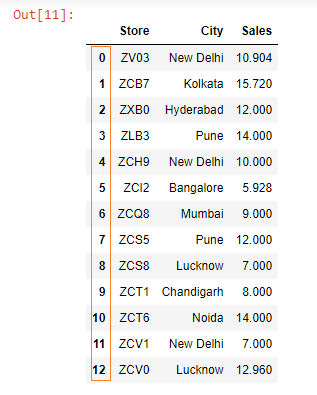
We have successfully combined the DataFrames; however, we have got a problem.
The problem is: in the combined salesQ4 DataFrame, we can’t identify which sales figures belong to which DataFrame.
We can solve this problem by passing a List to the keys parameter. The List items will correspond to their respective DataFrames. (We can name the List items anything we want).
salesQ4 = pd.concat([salesJan, salesFeb, salesMarch], keys=["January", "February", "March"])

salesQ4
Output:
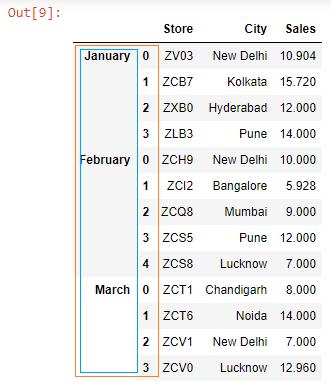
The result is a multi-index DataFrame.
Now consider a scenario where the columns in the DataFrames are not in the same order.
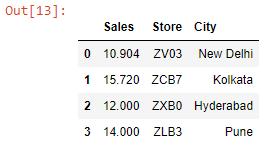
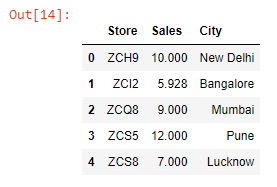
I will reorder the columns in the salesJan & salesFeb Excel files. The order in the salesMarch file remains the same.
Let’s read the Excel files into DataFrames:
import pandas as pd

salesJanMod = pd.read_excel("salesJanMod.xlsx")

salesFebMod = pd.read_excel("salesFebMod.xlsx")

salesMarch = pd.read_excel("salesMarch.xlsx")
Let’s preview these DataFrames:
salesJanModOutput:
salesFebModOutput:
salesMarchTwoOutput:
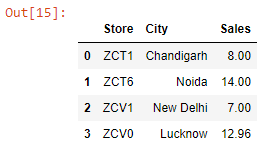
Let’s combine these DataFrames:
pd.concat([salesMarch, salesFebMod, salesJanMod,], keys=["Mar", "Feb", "Jan"]).fillna(value="N/A")Output:
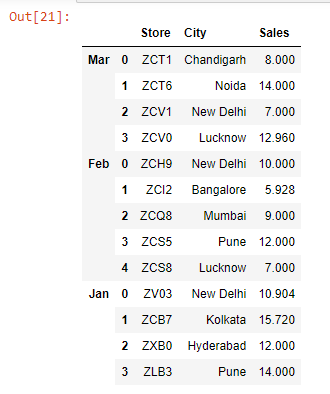
Even though the columns were in different order, Pandas did manage to combine the 3 DataFrames without any problem.
We can combine the DataFrames horizontally as well by passing axis = “Columns” to the concat() method.
pd.concat([salesJanMod, salesFebMod, salesMarch], keys=["Jan", "Feb", "March"], axis="columns")Output:
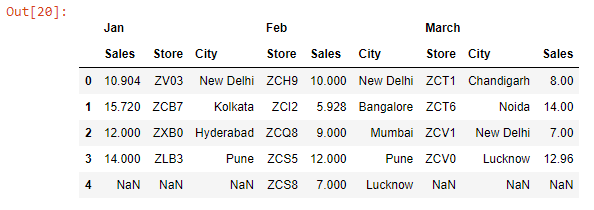
In our case, combining the DataFrames horizontally does not make sense. However, there might be scenarios when you would want to do that.